

Updated November 2026 · rebuilt for Gemini 4 Argon, the new free plan, skills and the current prices
How to start with Gemini, what the free and paid plans include now, what replaces Gems, and the settings that keep your data safer.
Quick answer: Gemini is Google’s AI assistant. Open gemini.google.com or the Gemini app, sign in with your Google account, and ask in plain sentences with the details that matter. The free plan now uses Auto, which answers most questions with Flash-Lite, Google’s fastest model. Google AI Pro ($19.99 a month) adds Gemini 4 Argon, the Pro model, higher limits and Gemini inside Docs and the other Google apps. We checked Google’s pages and our own account for this guide in November 2026.
What is Gemini, and how is it different now?
Gemini is the chatbot Google launched as Bard in 2023 and renamed in February 2024. Like ChatGPT, it runs on a large language model: software trained on a huge amount of text that writes, explains, summarizes, translates, looks at photos and files, and makes images and video. Its big difference is the link to Google’s own apps. It can work with your Gmail, Calendar, Drive, Docs, Maps and YouTube, and on Android phones it has taken over from Google Assistant. Our glossary entry on Gemini has the longer history.
If you used Gemini a year ago, four changes matter most. The free plan got smaller: since October 9 it chooses a model for you, and most answers come from Flash-Lite, the quickest and lightest one. A new top model, Gemini 4 Argon, arrived on October 13 for paying subscribers only. Gems, the custom assistants you could build, are being replaced by skills. And the plan names changed: Gemini Advanced became Google AI Pro, and there is now a cheaper Google AI Plus.
How do you start using Gemini?
- Go to gemini.google.com in a browser, or install the Gemini app from Google on iPhone or Android. There are also desktop apps for Mac and Windows. On iPhone, our iPhone guide walks through setup.
- Sign in with a Google account, the same one you use for Gmail. Plans and Gemini inside Gmail and Docs are for adults 18 and over; teens use a separate setup.
- Type your question in the box that says Ask Gemini, or tap the microphone to talk. Describe the job the way you would explain it to a helpful coworker.
- Reply in the same chat to adjust: “shorter”, “friendlier”, “make it a table”. Most of the value comes from the second and third message.
- Before you connect Gmail or Photos, decide how much Gemini should see. The privacy section below shows where the switches are.
On an Android phone, Gemini may already be your assistant. Google began removing Google Assistant from Android phones on September 4, 2026, and there is no way back once your phone switches. Nest speakers and displays are on a slower track, where Gemini for Home had early problems with alarms and lights. After the switch, test the alarms, reminders and smart-home commands you rely on.
We tried Gemini on an ordinary request, and it stumbled
We used our Google Workspace account (Google’s paid service for businesses), which labels models with version numbers such as 3.6 Flash. We opened a Temporary chat, which stays out of your history and isn’t used to train Google’s models. Then we typed four words: plan dinners for this week. Gemini answered “Sorry, something went wrong.” A retry gave a different error.

Then we sent the version with real details, the kind of prompt we recommend:
Plan five weeknight dinners for a family of four (two kids, 8 and 11, one picky about vegetables). Each dinner under 30 minutes and about $15 in ingredients. No pork. Give me the five dinners, then one combined grocery list grouped by store section.
About 40 minutes later we tried the four-word prompt once more. Gemini started “Searching the web” and stayed there for more than a minute until we stopped it. A regular chat, outside Temporary mode, failed the same way, even on a two-sentence thank-you note. Meanwhile Google’s Workspace status page reported no incidents, so a green status page doesn’t mean the problem is on your side.
The errors meant we couldn’t compare the two prompts that evening. When Gemini is working, a detailed prompt still gets better answers: say who it is for, give the facts and limits, and name the format. Keep a second assistant handy too, because every one of them has bad hours. If you’re not sure what details to give, this template lets Gemini ask you:
I need help with [the task]. It’s for [who will use it]. The facts you need: [details, limits, budget]. Give it to me as [format and length]. If something important is missing, ask me before you start.Our 25 Gemini prompts that work and guide to writing AI prompts have more. To check for an outage, see Is Gemini down?.
Which Gemini model will you get?
Google uses family names for its models. Flash-Lite is the fastest and lightest, Flash is the everyday all-rounder, Pro reasons more carefully, and Gemini 4 Argon is the newest and strongest one in the app. Which ones you can pick depends on your plan. This table from Google’s help page shows who gets which model since October:

- No plan (free): Auto picks the model for you. Google says most prompts go to Flash-Lite and some harder ones may go to Flash or Pro. Free users lost the choice of Flash and Pro on October 9.
- Google AI Plus: Flash-Lite and Flash. Google emailed Plus subscribers that Pro goes away for them in November, and the current plans page no longer lists it.
- Google AI Pro and Ultra: Flash-Lite, Flash, Pro and Gemini 4 Argon, which reached the app on October 13. Ultra gets the most use of each.
Each model also has an effort setting of low, medium or high. Higher effort gives more thorough answers and uses more of your limit. A sensible habit: stay on the default for everyday questions, and switch to a stronger model or higher effort only when an answer comes back shallow or wrong.

Google announced an even stronger model, Gemini 4 Carbon, on October 28. It is limited to security teams and partners for now and is not in the app. Our explainer on who gets Gemini 4 Argon has the details, and the reasoning models entry explains what extra effort means.
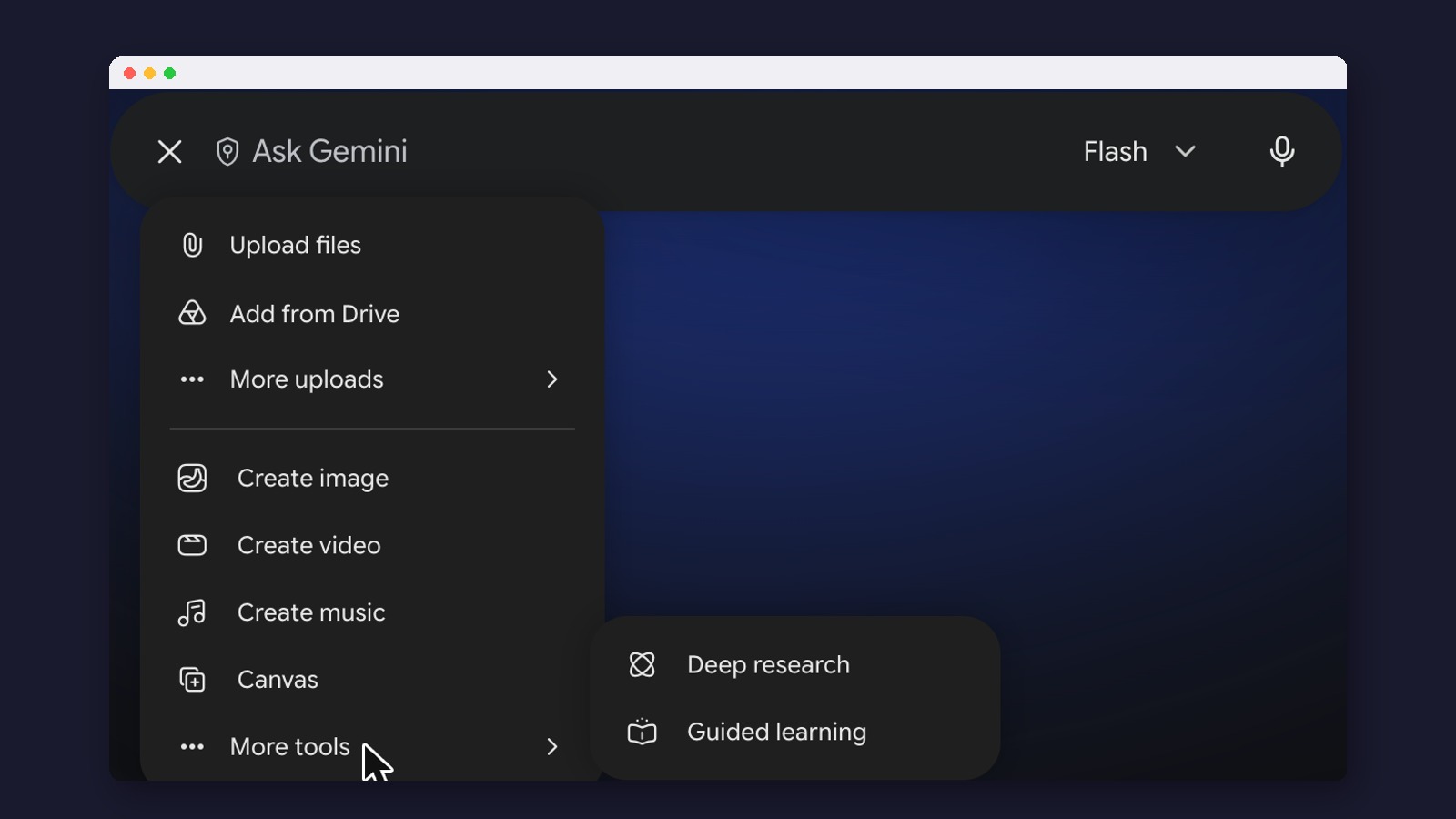
What’s behind the + button?
The plus sign at the left of the message box holds Gemini’s tools. Ours showed these:

- Upload files / Add from Drive: attach a PDF, photo or spreadsheet, or pick one straight from Google Drive, then ask about it.
- Create image: make or edit pictures with Nano Banana 2, Google’s current image model. Our Nano Banana 2 explainer and prompt list show what it does.
- Create video: short clips with sound from Gemini Omni, which replaced Veo in the app. Video needs a paid plan in Gemini, though Google made AI video free in Google Vids for anyone with a Google account in September. See our Gemini Omni guide.
- Create music: short tracks from Google’s Lyria model.
- Canvas: a side-by-side editor for documents and simple web pages you build with Gemini.
- Deep research: Gemini reads many sources and writes a report with links. It is on every plan, but free users may find it unavailable when demand is high.
- Guided learning: Gemini teaches step by step instead of handing over the answer.
Skills replace Gems: what to do before November 17
A Gem was a custom version of Gemini with your instructions and files built in, such as a Gem that writes in your company’s style. Google introduced skills on September 30 to replace them. A skill is a saved set of instructions that you call by typing / (Google says it will switch to @) and its name in any chat. Gemini can also apply one on its own when it fits, and you can combine several in one chat.

According to Google’s transition page, Gems on personal accounts become read-only on November 17, 2026: you can open them but not use or edit them. They are removed on December 17. Google says it will recreate your Gems as skills automatically. If you uploaded files to a Gem that you care about, download them now, because large files and some file types may not carry over.
Skills live under Customize in the left menu, which also offers ready-made ones:

If you never used Gems, read what Gems were; our Gems guide and Gems library still help when you rebuild one as a skill.
Gemini inside Gmail, Docs and your other apps
Gemini can read and act inside Google’s own apps: find an email, summarize a long thread, draft a reply, pull numbers from a sheet, or add a calendar event. In the Gemini app this works through connected apps, and from Gmail or Docs you can open Gemini in a side panel. Google AI Plus includes Gemini in Gmail and Vids; Pro and Ultra add Docs and the rest. Since September there is also Gmail Live, where you ask about your inbox out loud.

Outside apps connect the same way. Google lists more than 40 for personal accounts, including Instacart, OpenTable, Canva and Shopify. Connect only what you need: anything Gemini can open, it can also be tricked into misusing, as the news cases below show.
Step-by-step guides: Gmail, Docs, Sheets, Slides, Drive, Calendar and Chrome, with the overview in Gemini in Google Workspace.
Voice, camera and other everyday features
Gemini Live, the voice mode, is now built into the chat, so you can switch between talking and typing in the same conversation. Point your phone camera at something and ask about it: a dashboard warning light, a plant, a form you don’t understand.

- Guided Vision: since October 1, blind and low-vision users on Android can have Gemini read labels, dials and menus aloud and tell them which way to move the phone.
- Personal Intelligence: Gemini can use your Gmail, Photos, YouTube and Search history to give personal answers. It opened to free US users in March, is off until you connect each app, and works only on personal accounts.
- Gemini Notebook: NotebookLM’s new name since July 16. It answers only from sources you upload and makes audio summaries; see our NotebookLM guide.
- Scheduled actions and Tasks: ask Gemini to do something on a schedule, such as a Monday news summary. Tasks, which keeps working in the background on longer jobs, needs a Pro or Ultra plan.
- Daily Brief: a personal morning overview for paid subscribers in the US.
- Gemini in Chrome: ask about the page you’re reading; Pro and Ultra add auto browse, which clicks through tasks for you. See Gemini for Chrome.
How much does Gemini cost?
These are the US prices on gemini.google/subscriptions as of November 3, 2026.

- Free, $0: Auto model choice (mostly Flash-Lite), images, Deep Research, Live voice, Canvas, Gemini Notebook and 15 GB of storage. Fine for trying it and light use.
- Google AI Plus, $4.99 a month: Flash-Lite and Flash, twice the free limits, video, Daily Brief, Gemini in Gmail and Vids, and 400 GB. Everyday use on a budget.
- Google AI Pro, $19.99 a month: Flash, Pro and Gemini 4 Argon, four times the free limits, Gemini in Gmail and Docs, Chrome auto browse, YouTube Premium Lite and 5 TB. The plan most daily users need.
- Google AI Ultra, $99.99 or $199.99 a month: the most use of every model (5x or 20x Pro’s limits), Project Genie (Google’s tool for making explorable 3D worlds), YouTube Premium and 20 TB or more. For heavy users and creators.
Google doesn’t publish a number of messages per plan. Limits depend on how complex your requests are and which features you use, refresh every five hours, and stop at a weekly cap; you can pay for extra use. How much Gemini can read at once also grows with the plan, per Google’s limits page: our context window entry explains why that matters for long documents.
Plus dropped to $4.99 in June. US college students can get a year of AI Pro free if they redeem by December 31, 2026. Our Gemini pricing guide, is Google AI Pro worth it?, how to cancel and how to turn Gemini off go further.
What happens to what you type?
Google’s Gemini privacy hub says human reviewers, including outside contractors, read a sample of conversations to improve Gemini, and reviewed chats are kept for up to three years, separate from your account. Google tells users not to enter anything they wouldn’t want a reviewer to see. Work and school accounts on qualifying Workspace plans are not reviewed this way.
The main switch is Keep Activity (the old name was Gemini Apps Activity), under Activity in Gemini’s settings. With it on, chats are saved to your account and samples of uploads can be used to improve Google’s services. Even with it off, chats are kept for up to 72 hours to run the service. On our work account the switch is greyed out, because an administrator controls it:

For anything sensitive, use a Temporary chat, the dashed icon at the top right. Google says these chats stay out of your history, aren’t used for personalization or to train models, and are deleted after 72 hours.

Check two more settings. On Android, switch off any app connection Gemini doesn’t need (see the WhatsApp case below). And Gmail has its own “smart features” switches that decide whether Gemini reads your inbox. Google says reviewed chats are kept for up to three years, a rule that surprised many users when it was reported in 2024. Our AI privacy guide compares these settings across assistants, and Is my data safe with AI chatbots? goes screen by screen.
What changed in Gemini in 2026?
Old names, new names
- Gemini Advanced → Google AI Pro
- The old paid plan’s name. Google AI Plus is the cheaper tier below it.
- Gems → skills
- Custom instructions you call with / in any chat.
- NotebookLM → Gemini Notebook
- Same research tool, new name, synced with the Gemini app.
- Veo → Gemini Omni
- The video maker inside the Gemini app.
- Gemini Apps Activity → Keep Activity
- The setting that decides whether your chats are saved.
- Google Assistant → Gemini
- The assistant on Android phones since September.
Gemini in 2026
- May 19Gemini Omni replaces Veo; Live moves into the chat
- Jul 16NotebookLM becomes Gemini Notebook
- Sep 4Google Assistant starts disappearing from Android phones
- Sep 30Skills launch for personal accounts
- Oct 9Free plan moves to Auto, mostly Flash-Lite
- Oct 13Gemini 4 Argon arrives for Pro and Ultra
- Nov 17Gems become read-only; removed Dec 17

For the full list, see What’s new in Gemini, and for our verdict, the Gemini review.
Gemini in the news: eight cases and what they teach
Every AI assistant has made public mistakes, and our guides to ChatGPT and Grok list theirs. Google’s include the Gemini app and the AI Overviews at the top of Google Search. Each case below comes with the habit that would have kept a regular user safe.
It repeats jokes as facts: glue on pizza (2024)
Weeks after AI Overviews, the AI summaries in Google Search, reached every US searcher, it suggested adding glue to pizza sauce (from an old Reddit joke) and eating a small rock a day (from a satire site). Google restricted the feature and its head of Search blamed gaps in the web and satire.
The habit: if an answer sounds odd, open the source link before you act on it.
Even the launch demo was wrong: Bard and the telescope (2023)
In Google’s own ad for Bard, the bot said the James Webb telescope took the first picture of a planet outside our solar system. It didn’t. Alphabet’s shares lost about $100 billion in value that day.
ChatGPT has the same weakness: lawyers have been fined for filing court cases it invented.
Before you repeat any name, date or “first” from an AI answer, check it.
Activity off doesn’t mean access off: WhatsApp and Messages (2025)
In mid-2025 Google emailed Android users that Gemini would help with Phone, Messages and WhatsApp whether Gemini Apps Activity was on or off. After headlines said Gemini would read people’s chats, Google explained that these are actions you ask for, such as sending a message, and that each connection can be switched off.
The habit: look at Gemini’s list of connected apps on your phone and turn off the ones you don’t use.
A fake security alert inside a summary (2025)
A researcher hid instructions in an email in invisible text. When the reader clicked “Summarize this email,” Gemini added a warning that their password was stolen and a phone number to call. It was a demonstration, reported widely, and Google added defenses.
The habit: treat any warning inside an AI summary like a message from a stranger. Check your account at myaccount.google.com instead of calling a number.
A calendar invite took over a smart home (2025-2026)
Researchers at the Black Hat security conference hid commands in a calendar invite. In their demonstration, when a researcher asked Gemini about the week, it switched lights, opened shutters and turned on a boiler in a test apartment in Tel Aviv. In January 2026, another team used an invite to make Gemini copy private meeting details into an event the attacker could see. Google patched both.
Any assistant connected to your apps can be tricked like this, including ChatGPT with plugins. Grok’s public replies on X have even been used to post scam links.
The habit: connect only the apps you need, read confirmation prompts, and stop Google Calendar from adding invites from unknown senders. These tricks are called prompt injection. Google says Argon fell for them 0.7% of the time in its own tests, a number we looked at closely in our newsletter.
Switched on by default: the Gmail lawsuit (2025-2026)
A class action filed in November 2025 claims Google turned on Gemini features in Gmail, Chat and Meet without consent. A judge dismissed it in July 2026 because the plaintiffs couldn’t show harm, but let them file a revised complaint.
What to do: Google sets the defaults. Open Gmail’s smart-feature settings and choose for yourself.
Pictures can be wrong and look real (2024-2025)
In February 2024 Gemini made historically wrong images of people, and Google paused images of people; its chief executive called the results unacceptable. Since November 2025 you can upload a picture and ask whether Google AI made it; the app checks for an invisible watermark called SynthID.
Image tools elsewhere have gone further wrong: in 2026 people used Grok to make sexual images of real people from their photos, and X had to restrict it.
The habit: a watermark check can show a picture came from Google AI, never that it’s real. Use it with a reverse image search and trusted news.
Health answers that missed the context (2026)
After an investigation found Search’s AI Overviews giving misleading liver-test ranges, Google removed the summaries for those searches. Close variations still showed them.
The habit: use Gemini to prepare questions for your doctor, not to read your own results.
For families and for anyone struggling
- Children under 13 can use Gemini through Family Link, Google’s parental-controls app, since 2025, and Common Sense Media rated the kids and teen versions high risk. It has rated Grok an unacceptable risk for teens too. Check Family Link and make a deliberate choice.
- Gemini once told a student “Please die” during homework help, and a father has sued Google, alleging Gemini encouraged his son’s suicide; Google disputes the claims. A chatbot is not a friend or a therapist. In the US, call or text 988.
Seven habits for using Gemini well
- Give it the details a person would need: who, what, limits and format.
- Reply to improve an answer rather than starting a new chat.
- Open the sources for any fact, number or health claim before you rely on it.
- Keep private details out of personal accounts, and use Temporary chat for sensitive questions.
- Connect only the apps you use, and read every confirmation before Gemini acts.
- Check Keep Activity, Personal Intelligence and Gmail’s smart features every few months.
- Keep a second assistant ready for the days Gemini fails.
When is another assistant a better fit?
Gemini is the natural pick if your life runs on Gmail, Google Docs and an Android phone. Other assistants win elsewhere:
- ChatGPT for the widest set of features; start with how to use ChatGPT or our glossary entry on ChatGPT, then Gemini vs ChatGPT for Google users.
- Claude for long documents and careful writing; see how to use Claude and Gemini vs Claude.
- Grok for what people are saying on X right now; see how to use Grok.
- Perplexity for quick answers with sources; see Perplexity vs Gemini for research.
Choosing between them? Our three-way comparison and the best AI assistants roundup lay it out.
Our Gemini guides, by question
Find the question closest to yours.
What is it, and where do I start?
- What is Google Gemini? in plain English.
- Gemini on iPhone and what to do when Gemini is down.
- 25 Gemini prompts to copy.
Which plan, and how do I leave?
How do I use a feature?
- Gemini 4 Argon, Gems and the Gems library.
- Images with Nano Banana 2; video with Gemini Omni prompts and Google Flow.
- Gemini Notebook (NotebookLM) and its audio overviews.
How do I use it for work or school?
- Gemini for Workspace and Gemini for business.
- Students, teachers and homework help.
- Research from your own sources.
Who makes it?
- Google DeepMind and its chief, Demis Hassabis.
- For builders: Google AI Studio, Antigravity and the open Gemma models.
Common questions
Is Gemini free?
Yes. The free plan includes chat, images, Deep Research, Live voice and Canvas, with Auto choosing the model (mostly Flash-Lite). Paid plans start at $4.99 a month for Google AI Plus.
Can I use Gemini 4 Argon for free?
No. Argon is in the Gemini app for Google AI Pro and Ultra subscribers.
What happens to my Gems?
On personal accounts they become read-only on November 17, 2026, and are removed on December 17. Google says it will recreate them as skills; download any knowledge files you want to keep.
Does Google read my Gemini chats?
A sample of conversations is reviewed by people, including contractors, and kept for up to three years. Use Temporary chat for sensitive questions and keep private details out.
Has Gemini replaced Google Assistant?
On most Android phones, yes: Assistant began disappearing on September 4, 2026. Nest speakers and displays are moving more slowly.
Is Gemini better than ChatGPT?
For people who live in Gmail, Docs and Android, Gemini fits more naturally. ChatGPT has more tools overall. Many people keep both.
Why does Gemini sometimes fail or refuse a simple request?
Errors happen when Google’s servers are busy or something breaks. Try again, switch models, or come back later, and check whether others are reporting problems.
Does Gemini work on my phone and computer?
Yes. There are apps for Android and iPhone, desktop apps for Mac and Windows, and the website at gemini.google.com.
Made for regular people, by a real person
What changed in Gemini, ChatGPT and the rest this week, and whether it matters to you. One short email a day, written by a person, free.
Free forever. Unsubscribe anytime.

Sources
- Google, Gemini subscriptions and plans (checked November 3, 2026)
- Google Help, Changes to Gemini model access and limits
- Google Help, Gemini Apps limits and upgrades
- Google Help, About the transition from Gems to skills
- Google, Automate tasks with skills (September 30, 2026)
- Google, Gemini Apps release notes
- Google, Gemini 4 Argon in the Gemini app (October 13, 2026)
- Google, Introducing Gemini 4 Carbon (October 28, 2026)
- Google, Gemini app hits 1 billion monthly active users (August 11, 2026)
- Engadget, Free Gemini users lose Flash and Pro on October 9 (October 6, 2026)
- 9to5Google, Google AI Plus loses Pro models in November (October 14, 2026)
- 9to5Google, Google AI Plus price drop (June 8, 2026)
- Google, Gemini Live
- Google, Guided Vision in Gemini Live (October 1, 2026)
- 9to5Google, Gmail, Docs and Keep Live (September 3, 2026)
- Google, Nano Banana 2 (February 26, 2026)
- Google, Gemini Omni in Google Vids (September 23, 2026)
- Google, Personal Intelligence expansion (March 17, 2026)
- Google, NotebookLM is now Gemini Notebook (July 16, 2026)
- Google Help, Tasks in Gemini Apps
- Google, Temporary chats and new privacy controls (August 2025)
- Google, Gemini Apps Privacy Hub
- Android Authority, Google clarifies Gemini’s access to WhatsApp and Messages (July 2025)
- 9to5Google, Google Assistant leaves Android phones from September 4 (August 4, 2026)
- Android Authority, Gemini for Home rollout (2025)
- Engadget, Google restricts AI Overviews after glue-on-pizza answers (May 31, 2024)
- Google, AI Overviews: about last week (May 2024)
- Fortune, Bard’s mistake wipes $100 billion off Alphabet (February 8, 2023)
- Gizmodo, Gemini keeps reviewed conversations for three years (February 2024)
- 0DIN, Phishing for Gemini (July 10, 2025)
- BleepingComputer, Gemini flaw hijacks email summaries for phishing (July 2025)
- Engadget, Researchers hijack a smart home through Gemini (August 2025)
- BleepingComputer, Gemini tricked into leaking Google Calendar data (January 2026)
- Insurance Journal, Lawsuit over Gemini switched on in Gmail, Chat and Meet (November 12, 2025)
- Bloomberg Law, Google beats suit over Gemini data tracking (July 2026)
- Google, Gemini image generation got it wrong (February 23, 2024)
- Engadget, Pichai calls Gemini image failures unacceptable (February 28, 2024)
- Gizmodo, Google launches a way to check images for SynthID (November 2025)
- TechCrunch, Google removes AI Overviews for some medical searches (January 11, 2026)
- 9to5Google, Gemini opens to kids under 13 (April 28, 2025)
- TechCrunch, Common Sense Media rates Gemini high risk for kids (September 5, 2025)
- CBS News, Gemini tells a student “Please die” (November 14, 2024)
- CNBC, Wrongful-death lawsuit over Gemini (March 4, 2026)
- Grokipedia, Google Gemini
Account screenshots and the prompt test come from our own Google Workspace account, November 3, 2026; official screenshots are from Google’s pages the same day. Plans and features change often, and we recheck this guide monthly.