

One request got us a small animated aquarium inside a Claude chat. Four more turned it into a reef with feeding, a sea turtle, a treasure chest and a deep-sea mode. Here are all five prompts, and the habit that made each round work.
The short version: paste Prompt 1 into a new Claude chat, look at what you get, then send Prompts 2 to 5 one at a time in the same chat. Each prompt says what to keep and what to add, which is why the aquarium got better instead of starting over. We used Haiku 5.5 on Medium effort in a regular chat, with no coding. Claude said it checked the controls by reading its code without running them, so click every button yourself.
What did we ask Claude to make?
A fish tank you can play with, drawn right inside the conversation. The first request asked for colorful fish that swim naturally, bubbles, plants, a way to add fish by clicking, and a switch between day and night. Everything after that was an improvement on the version before.
If you have not used Claude before, our guide to using Claude covers signing up and starting a chat. We picked Haiku 5.5 from the model menu. Free accounts get Sonnet 5.5, as our newsletter covered in Claude’s free tier now runs a model that nearly ties Anthropic’s best, and the pricing page lists Haiku on the Free plan too. We have not run these five prompts on a free account.
Version 1: the starting aquarium
Claude’s first answer was a light blue tank with swimming fish, plants and a column of bubbles, plus four buttons across the top: Add fish, Night, Bubbles on and Clear. Claude said clicking the water drops in a new fish, and that the tank holds up to 40.

Create an interactive animated aquarium I can enjoy in this chat. Include colorful fish that swim naturally, bubbles and aquatic plants. Let me click to add fish and include a day/night toggle. Make the design inviting and make sure the controls work.Version 2: more beautiful, same controls
The second prompt asked for something more beautiful and relaxing, and named every control that had to keep working. Claude added coral on rocks, sea anemones, starfish and kelp, and replaced the fish with seven species, including a clownfish, a blue tang and a spotted puffer. At night, Claude says, the coral tips glow.

Claude ended that reply with this line: “I have not run this in a browser, so I checked the controls by reading the code rather than by testing them.” In other words, Claude had not tried the buttons. In our video, Night, Feed fish, the chest and the Deep sea button all respond. We did not click Add fish, Bubbles or Clear on camera, so check those yourself.
Make a second version of this aquarium that is noticeably more beautiful and relaxing. Give it richer underwater scenery and more varied fish, while keeping the add-fish, day/night, bubbles, and clear controls working.Version 3: feeding and a speed slider
This version gives the fish something to react to. A Feed fish button drops food into the water, and the tank reports “Food dropped. The fish are on their way.” A Speed slider, starting at 1x, sits under the buttons. We did not move it on camera, so try it yourself.

Make a third version of this aquarium. Keep the colorful reef and existing controls, and add a Feed fish button that drops food into the tank and makes nearby fish swim toward it. Add a simple speed slider so I can slow down or speed up the fish.Version 4: a turtle and a treasure chest
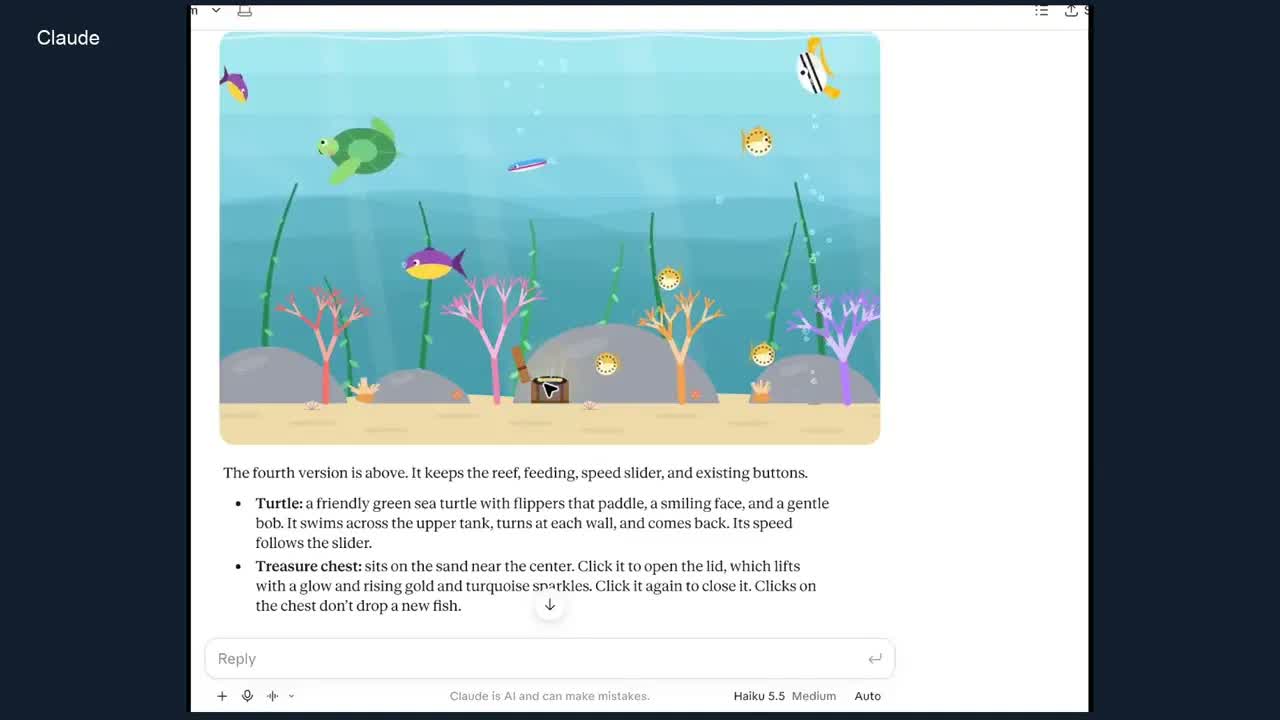
Prompt 4 asked for a friendly sea turtle and a chest on the sand that opens when clicked. Claude’s description: the turtle paddles across the upper tank, turns at each wall and follows the speed slider, and the chest lid lifts with a glow and rising sparkles. Claude also said it stopped clicks on the chest from dropping a new fish there, a detail nobody asked for.

Make a fourth version. Keep the reef, feeding, speed slider, and existing controls. Add a friendly sea turtle that swims across the tank, and a treasure chest on the ocean floor that opens when I click it. Make sure the new interactions work.Version 5: switch to the deep sea
The last prompt changed the whole setting. A new Deep sea button fades the water to near black with glowing coral, and the turtle and fish stay in the tank. Press it again, now labelled Reef, and the bright version comes back.

Make a fifth version. Keep the turtle, clickable treasure chest, feeding and existing controls. Add a button that switches between this colorful reef and a glowing deep-sea scene, so I can switch between them anytime.Five prompts, one aquarium
What each prompt added
- New feature
- Version 1The tankFish, plants, bubbles, click to add, day and night
- Version 2A real reefCoral, kelp, starfish and seven kinds of fish
- Version 3Feeding timeFeed fish button and a speed slider
- Version 4New neighborsA sea turtle and a chest that opens
- Version 5Deep seaOne button swaps the reef for a dark, glowing scene
Why did each round build on the last?
Look at Prompts 2 to 5. Every one names what to keep as well as what to add: “Keep the reef, feeding, speed slider, and existing controls.” Without that line, an AI tool may rebuild from scratch and drop a feature you liked. Anthropic’s own advice on writing prompts makes the same point in general terms: say exactly what you want, because Claude lacks the context in your head.
The other habit is small steps. Each round added one or two things, so when something looked wrong, we knew which request caused it. And if you do not like a change, you do not have to keep it. Ask Claude to go back to the version before.
You can use this loop for anything you make with AI: make something, look at it, then ask for one specific change. Our guide to writing AI prompts covers the basics. Here is the improvement prompt with the aquarium taken out:
Make a new version of this [what you made]. Keep [the parts you like, by name]. Add [one or two specific changes]. Make sure [the new part] works.What should you check yourself?
- Every button. Claude told us it read the code instead of testing it. Click each control after every version, not just the new one.
- The things you asked to keep. If one disappears, say so in your next message and name it.
- The slider at both ends. Animations tend to break at the very slow and very fast ends.
- The length of your chat. Five versions in one chat is a long conversation. If Claude starts forgetting earlier details, ask Claude for the full code of the latest version, then start a new chat and paste it in.
Other things to try with the same method
An aquarium is a gentle first project because you can see right away whether it worked. The same five-step pattern works for a small game, a checklist or a web page. For more starting points, see 12 things you can make with Claude, or have Claude make animations you can download as a video in our animations walkthrough. The aquarium is one of Claude’s inline visuals, which live inside the reply and are not saved on their own. To keep one, download it or ask Claude to save it as an artifact. Our guide to Claude artifacts explains those shareable pieces.

Frequently asked questions
Do I need to know how to code?
No. Every prompt is plain English. Claude writes the code behind the aquarium and shows you the result in the chat.
Which Claude model should I use?
We used Haiku 5.5, the fastest of Anthropic’s current models, on Medium effort, a setting for how much Claude thinks before it answers. Use whichever model your account offers. If a version comes out broken, ask Claude to fix the specific button that failed.
Does it cost anything?
Claude has a free plan as well as paid ones, listed on its pricing page. We have not tested these prompts on the free plan.
Can I keep my aquarium?
Inline visuals like this one are not saved separately once the conversation moves on, according to Anthropic’s help article. You can download one or save it as an artifact. The same article says inline visuals are in beta on the web and desktop apps, and do not show in the iPhone or Android app.
Why did my aquarium come out different?
Claude writes new code each time, so the fish, colors and layout will vary. The prompts ask for the same features, so you should get similar buttons and behaviors, drawn in a different style.
Can I send all five prompts at once?
You can try, but you skip the check that makes this work. Sending them one at a time lets you look at each version and change your next request if something is off.
Made for regular people, by a real person
One AI tool, tip or how-to a day in plain English, tried before we write about it. Curated and edited by a human.
Free forever. Unsubscribe anytime.
You may also like
- 12 Things You Can Make With Claude
- Claude Animations
- Claude Artifacts Guide
- How to Write AI Prompts
- Claude Whiteboards
- Claude Reverse-Engineered a Game
- How to Use Claude AI
Sources
- Anthropic: Prompting best practices (Be clear and direct)
- Anthropic: Models overview
- Claude pricing
- Claude Help Center: custom visuals in chat
- Our video: recorded in the Claude desktop app with Haiku 5.5 on Medium effort. The screenshots are frames from it and the prompts are copied from the screen. Published November 16, 2026.