

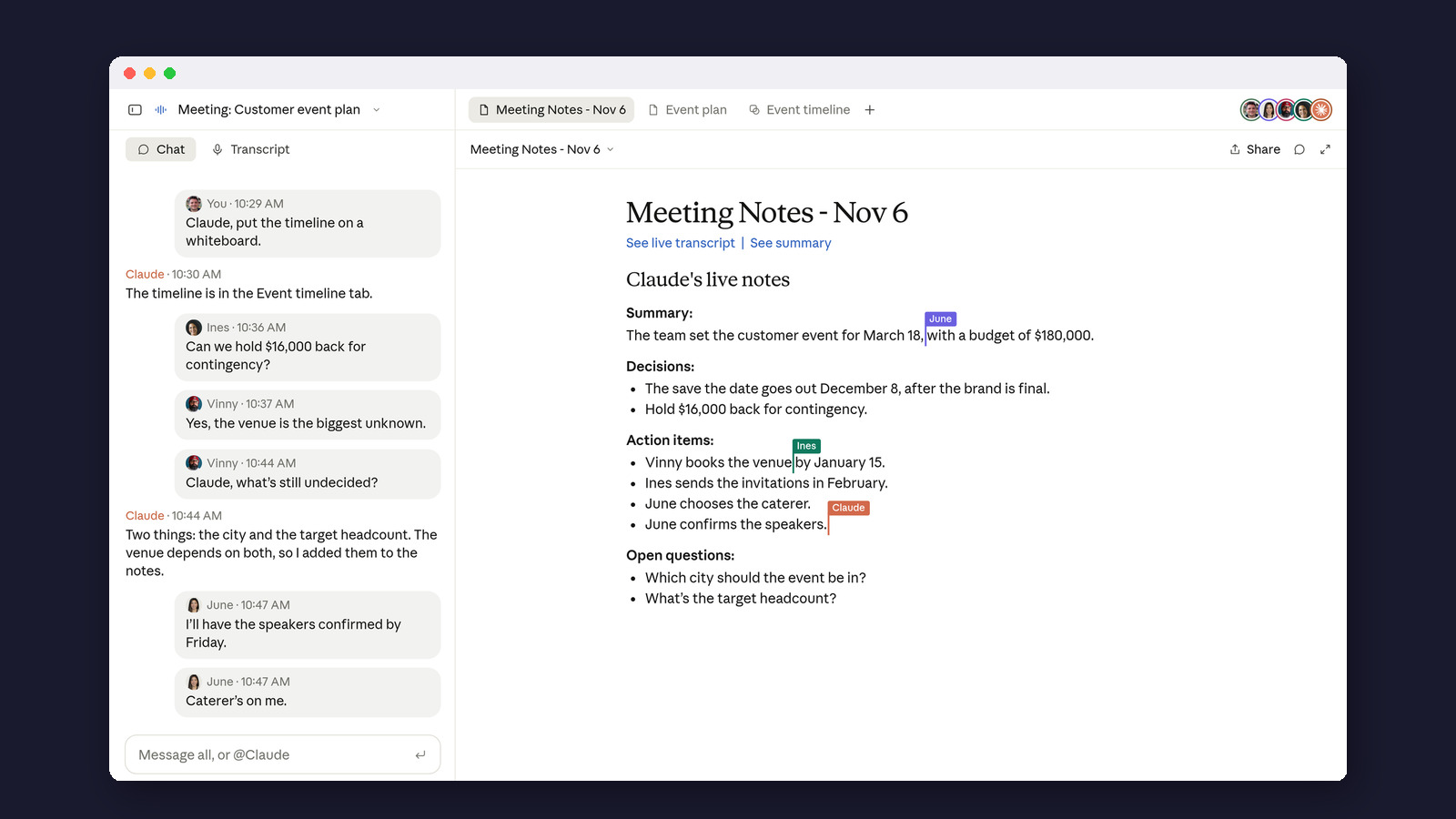
Anthropic’s new Claude Meetings sends Claude into your Google Meet calls to take notes, answer questions and build documents while you talk. This guide covers who can use it, how to set it up, what it costs and what it keeps.
The short version: Claude Meetings lets you add Claude to a video call as a visible participant. It writes a transcript, notes and action items, answers questions you ask out loud or in the chat, and can build a doc or whiteboard during the call. Afterward everything sits on a meeting page in claude.ai. Anthropic launched it as a test version (a beta) on November 12, 2026. It is only for Team and Enterprise plans, and only on Google Meet. It saves a transcript but not audio. Notes and transcripts are included in those plans, and docs and whiteboards made in calls are free through February 10, 2027. Personal plans (Free, Pro, Max and Ultra) don’t get it. We checked on an Ultra account and found no Meetings page at all.
Plenty of apps already take notes on video calls. The difference here is that Claude takes part. If someone says “Claude, make a whiteboard,” it starts building one while the team is still talking. Anthropic first said it was “coming soon” in its November 10 update, then started rolling it out in beta two days later. We read Anthropic’s announcement and Help Center guide, checked what a personal Claude plan shows, and tested the closest thing a personal-plan user can do today. Our account isn’t on a Team plan, so we haven’t sat in a call with Claude ourselves.
What is Claude Meetings?
It’s a way to bring Claude into a live video call. Claude joins as a participant with its own tile, like a colleague with the camera off, and posts a notice in the call’s chat so everyone knows it’s there. From then on it follows the conversation and does three jobs:
- Takes notes. A live transcript, then a summary and action items.
- Answers questions. Say “Claude” and ask, or type in the Meet chat. It replies in writing in the chat by default.
- Builds things. Ask for a doc or a whiteboard and Claude makes one while you talk. Teammates on the invite can edit it at the same time.

Anthropic’s example is a team planning a customer event. Someone asks Claude to draft a plan, someone else asks what last year’s event cost and Claude looks it up in a connected tool after asking permission, and then the team has Claude put the timeline on a whiteboard. The whiteboards are the same ones we tested on November 11 in our Claude Whiteboards review.

Words you will meet
- Meeting page
- The page in claude.ai that holds one call’s notes, transcript and anything Claude built.
- Auto-join
- A setting that sends Claude into your calendar meetings without adding it each time.
- Connector
- A link between Claude and another app, such as Slack or a CRM (customer-tracking software), so Claude can look things up there.
- Artifact
- Anything Claude makes for you to keep: a doc, a whiteboard, a sheet.
- Team plan
- Claude’s paid plan for groups of 2 to 150 people, billed per seat.
Who can use Claude Meetings right now?
Only people on a Team or Enterprise plan, and only on Google Meet. Anthropic says other video platforms are “coming soon” but hasn’t named them, so Zoom and Microsoft Teams users have to wait. The Help Center says it works in Claude and in Claude Desktop.
A few business setups are left out during the beta: companies with a “zero data retention” agreement (Anthropic keeps no copies of their chats), those using the HIPAA-ready health-privacy setup, and those that manage their own encryption keys. On Team plans Meetings is switched on by default and an owner can turn it off. On Enterprise plans it starts off and an owner turns it on for everyone or for chosen roles.
What about everyone else? We opened claude.ai on our own Ultra plan, Anthropic’s most expensive personal plan at $200 a month. There was no Meetings item in the sidebar, the claude.ai/meetings address showed “Page not found,” and Settings had no Meetings options.

How to add Claude to a Google Meet call
These steps come from Anthropic’s Help Center. Before you start, an owner on your team has to allow Google Calendar for the organization.
- Open Claude and click Meetings.
- Connect your Google Calendar.
- Pick a meeting from your calendar.
- Click Add Claude.
To skip the clicking, turn on auto-join under Settings > Capabilities > Meetings > Auto-join. You can send Claude to all your meetings or all of them except one-on-ones. An owner can’t switch auto-join on for you.

Claude usually joins without waiting to be let in. If the host has to admit it and says no, Claude stays out of that call unless someone adds it again.
What can you ask Claude during a call?
Start with its name, out loud or in the Meet chat. Anthropic’s examples include:
- “Claude, make a doc” or “Claude, make a whiteboard.” Each one attaches to the meeting page.
- A question about what was said, or about something in your connected tools, such as what last year’s event cost.
- “Stop listening” to pause it. You restart it from the meeting page.
- Asking it to leave, or clicking Remove Claude on the meeting page.
Anything Claude posts in the Meet chat is visible to everyone on the call. And Claude asks your permission the first time it uses one of your connected apps. For now, when someone asks it something out loud, it asks each time to confirm who is speaking. Claude can stay in a call for up to eight hours and warns you before it leaves.
What happens after the meeting?
Each call gets its own meeting page in claude.ai with the summary, action items, full transcript and everything Claude made. People from your organization who were on the invite get a recap email with a link, can edit what Claude built, and can share the page inside the company. A Meetings calendar lists past and upcoming calls, and you can ask Claude in a normal chat about any past meeting you have access to.

Anthropic says Gong, Attention, Granola, Fireflies.ai and Otter are working on a way to send a meeting’s transcript to their apps, so teams already using one of them won’t have to pick. That isn’t live yet.
Is Claude Meetings private?
According to Anthropic, this is what Claude keeps and who can see it.
- Saved: a transcript, a summary and descriptions of anything shared on screen. Not saved: the audio.
- Who sees it: people in your organization who were on the invite. Guests from outside never get the meeting page or the recap email.
- Outside guests: the Help Center says Team plans let Claude join calls with outside guests unless an owner turns that off, while on Enterprise an owner has to allow it first. (The announcement words it more strictly: Claude stays out of such calls by default until an admin allows it.) Where it isn’t allowed, Claude won’t join a call with an outside guest on the invite, and leaves if one joins later. Another company’s note-taking bot counts as an outside guest. Where it is allowed, Claude takes notes but doesn’t reply in the chat, and what guests say goes into the transcript.
- Your own setting: each person can also decide under Meetings with external guests in Settings.

Anthropic’s own advice is to make sure everyone is comfortable being transcribed before you add Claude or turn on auto-join. Separately, some states and countries require everyone’s consent before a call is recorded or transcribed; our guide to AI meeting-note tools covers the basics. A short note before the call does the job:
Hi all, quick heads-up: I’m adding Claude, Anthropic’s AI assistant, to our call on [day]. It will join as a participant, write a transcript and notes, and may draft a doc or whiteboard while we talk. It doesn’t save audio. If you’d rather not be transcribed, reply and I’ll leave it off.Claude isn’t the only note-taker that skips the audio. Our daily newsletter recently covered Amazon’s $75 Bee, which turns conversations into to-dos and says it deletes the audio. For what AI companies do with the rest of your data, see our AI privacy guide.
How much does Claude Meetings cost?
During the beta there’s no separate charge, but you need the plan. Prices from Anthropic’s pricing page on November 12, 2026:
| What | Price | Notes |
|---|---|---|
| Team, Standard seat | $25 a month, or $20 a month billed yearly | Teams of 2 to 150 people |
| Team, Premium seat | $125 a month, or $100 a month billed yearly | 5x the usage of a Standard seat |
| Enterprise | $20 a seat a month, billed yearly, plus usage | 20-seat minimum |
| Notes, transcripts, answers that don’t use other apps | Included | On Team and Enterprise |
| Docs and whiteboards made in calls | Free through February 10, 2027 | Anthropic hasn’t said what happens after |
| Answers that use a connected app | Counts toward your usage | Can add charges for the organization |
So the smallest way in is a two-person Team plan: two Standard seats at $50 a month, or $40 a month billed yearly.
We tried the workaround on a personal plan
If you’re on Pro, Max or Ultra, you can get most of the notes part today by pasting a transcript into a normal chat. Google Meet, Zoom and Microsoft Teams all have transcript features on many plans, and our Zoom connector guide shows how to pull them in automatically. We wanted to see whether Claude would invent details, the usual worry with AI notes.
So we wrote a short, made-up planning call between three people with two traps in it: nobody took on the job of emailing the neighbors about parking, and the music decision was pushed to “next week” with no one in charge of it. We pasted it into a new chat on our Ultra plan with this prompt, using Haiku 5.5, the account’s default model:
Below is a transcript from a team call. Write meeting notes with four parts: Summary (two sentences), Decisions, Action items (each with an owner and a due date), and Open questions. Only use what is in the transcript. If an owner or date is missing, write "not set". Then put the action items on a whiteboard, grouped by month.

Transcript:
[paste your transcript here]
Claude wrote the notes and a whiteboard in under a minute. All four action items matched the transcript. It marked both tasks without an owner as “not set” instead of guessing a name, and it pointed out that the transcript never says which year the dates fall in. It did make one slip: it put the music question under both Decisions and Open questions.


This workaround has limits. Claude isn’t in the call, so nobody can ask it questions live, and you have to fetch the transcript yourself. Our older Claude meeting summaries guide has more prompts for follow-up emails and different meeting types.
How does it compare with other meeting note-takers?
| Option | Works in | Plans | What you get |
|---|---|---|---|
| Claude Meetings | Google Meet | Claude Team, Enterprise | Notes, transcript, live answers, docs and whiteboards built during the call |
| Google Meet “Take notes for me” | Google Meet | Eligible Google Workspace editions or Google AI plans | A Google Doc of notes in the organizer’s Drive; 8 languages, one per meeting |
| Claude chat + a transcript | Any app that makes a transcript | Any Claude plan | Notes and a whiteboard after the call; no live help (our test above) |
| Dedicated note-takers (Otter, Fireflies.ai, Granola and others) | Varies by app | Their own plans | Notes and search; transfers from Claude Meetings promised later |
Google’s built-in option is the one to beat on Meet, and Google says it also works with an eligible Google AI plan, not only with work or school accounts. Where Claude differs is during the call, when it can look things up in your connected apps and build a plan while people talk. For a wider roundup, see our best AI for meeting notes comparison.
What we don’t know yet
- Zoom and Teams. Anthropic says more platforms are coming but gives no names or dates.
- Price after the beta. Docs and whiteboards are free through February 10, 2027. Nothing is said about notes and transcripts after the beta.
- Personal plans. No sign that Pro, Max or Ultra will get it.
- How long meeting pages are kept. The Help Center doesn’t give a retention period.
- How well it works live. We couldn’t test it in a call. We’ll update this page when we can.
New to Claude? Start with our guide to using Claude, or see how teams use Claude for ideas that fit a Team plan.

Frequently asked questions
Is Claude Meetings free?
It costs nothing extra during the beta, but only on a paid Team or Enterprise plan. Docs and whiteboards made in calls are free through February 10, 2027; answers that use a connected app count toward your usage.
Does Claude Meetings work with Zoom?
Not yet. It only works with Google Meet. Anthropic says other platforms are coming soon.
Does Claude record the audio of my call?
No. Anthropic says it saves a transcript, a summary and descriptions of shared screens, but not audio.
Can people outside my company see the notes?
No. Outside guests don’t get the meeting page or the recap email, though anything Claude posts in the Meet chat is visible to everyone on the call.
Can I use Claude Meetings on a Pro or Max plan?
No. It’s limited to Team and Enterprise. On a personal plan you can paste a call transcript into a chat instead, as in our test above.
Made for regular people, by a real person
One AI tool, tip or update a day in plain English, tried before we write about it. Curated and edited by a human.
Free forever. Unsubscribe anytime.
You may also like
- Claude’s New Whiteboards, Tested
- Best AI for Meeting Notes: 8 Tools Compared
- Claude for Meeting Summaries
- Zoom Claude Connector
- Calendly Claude Connector
- Claude Connectors Guide (2026)
- What’s New in Claude 2026
- How Teams Are Using Claude
Sources
- Anthropic: Introducing Claude Meetings, now in beta (November 12, 2026)
- Claude Help Center: Use Claude Meetings
- Anthropic: More ways to work with Claude (November 10, 2026)
- Anthropic: Claude pricing
- Google Meet Help: Take notes for me
- Our checks: a personal Claude Ultra account, November 12, 2026 (Meetings page and settings; transcript test with Haiku 5.5). Screenshots by Beginners in AI; demo images by Anthropic.