

Updated October 28, 2026
The short version: AI can help with almost anything that involves words, pictures or planning: writing and editing emails, explaining hard topics, summarizing documents, planning trips and meals, preparing for interviews, making images and answering questions with sources. You can do all 50 examples below with the free versions of ChatGPT, Claude or Gemini. OpenAI’s own research found most people use ChatGPT for practical advice, looking things up and writing, and nearly three in four messages have nothing to do with work.
Updated October 2026: refreshed all 50 examples for today’s tools, added what people use AI for most (with sources) and what is new this year, such as voice, photos and research mode.
“But what can it do for me?” That is the question most beginners ask first. Not how it works, but what it can help with in everyday life. Here are 50 concrete examples, grouped so you can find the ones that fit you. If you have never used an AI chatbot, our guide to using AI gets you set up in about ten minutes.
What do people use AI for most?
About half of American adults now use AI chatbots, according to Pew Research (2026). A large study of ChatGPT messages by OpenAI and university economists (NBER, 2025) shows what they use them for. Most of it is everyday help.
What people use ChatGPT for: everyday help, not just work
Practical guidance (how-to help, advice, tutoring)
Looking up information
Writing (drafting, editing, translating)
Images and other media
Technical help (coding, data)
Anthropic’s research on Claude points the same way: the most common things people ask it to produce are explanations, documents and guidance (Anthropic Economic Index, June 2026).
Writing and communication (10 things)
- Draft emails you have been putting off. Explain the situation and ask for a polite, professional email. Works for anything from an apology to asking for a raise.
- Proofread and improve your writing. Paste your text and ask: “Fix the grammar and make it clearer, but keep my voice.”
- Write cover letters. Share the job ad and your experience, and get a tailored first draft.
- Summarize long documents. Paste a report or article and ask: “Give me the key points in five bullets.”
- Translate text. AI chatbots translate well between dozens of languages. For anything legal or medical, get a professional to check.
- Write social media captions. “Write five Instagram captions for a photo of [description].”
- Write birthday and holiday messages. Tell it who it is for and one thing you love about them.
- Reply to a negative review. AI helps you sound calm and professional instead of defensive.
- Write product descriptions. Useful for anyone selling online.
- Change your tone. “Rewrite this to sound more confident, friendlier, or less passive-aggressive.”
Learning and education (10 things)
- Explain any idea simply. “Explain inflation like I am 12.” AI adjusts to any level.
- Make a study guide. “Create a study guide for [topic] with key terms and ten practice questions.”
- Quiz yourself. “Ask me ten multiple-choice questions on the American Civil War and correct my mistakes.”
- Learn a skill step by step. “Make me a two-week plan to learn the basics of Excel.”
- Get the main ideas of a book. “What are the key lessons of Atomic Habits?”
- Prepare for exams. Practice questions, explanations of tricky topics, and help finding gaps.
- Practice a new language. Vocabulary, grammar, corrections and conversation practice, including speaking out loud.
- Decode complicated paperwork. Paste legal, medical or financial jargon and ask: “Explain this in plain English.”
- Research with sources. Turn on web search, or a research mode, to get an answer with links you can check.
- Get book or course recommendations. “Recommend five beginner books on investing, easiest first.”
Work and career (10 things)
- Summarize meeting notes. Paste a transcript or rough notes and ask for decisions and action items.
- Outline a presentation. “Outline a ten-slide talk on [topic] for [audience].”
- Write performance reviews. AI helps you make feedback fair, specific and constructive.
- Brainstorm. “Give me 20 ideas for [a project, campaign, business or gift].” Then pick the best.
- Write job descriptions. Describe the role and get a clear, well-organized job posting.
- Prepare for interviews. “I am interviewing for [role]. Ask me the ten most likely questions, one at a time.”
- Pull the key facts from a file. Upload a PDF or spreadsheet and ask what matters in it.
- Write reports and proposals. Turn rough notes or bullet points into a structured first draft.
- Make templates. “Create a template for a weekly status report.”
- Understand your numbers. Paste data and ask what stands out and how to chart it.

Home and personal life (10 things)
- Plan a trip. “Plan seven days in Japan for two adults who love food and history, with a daily plan and rough budget.”
- Make a meal plan. “A week of healthy dinners for a family of four, using normal supermarket ingredients.”
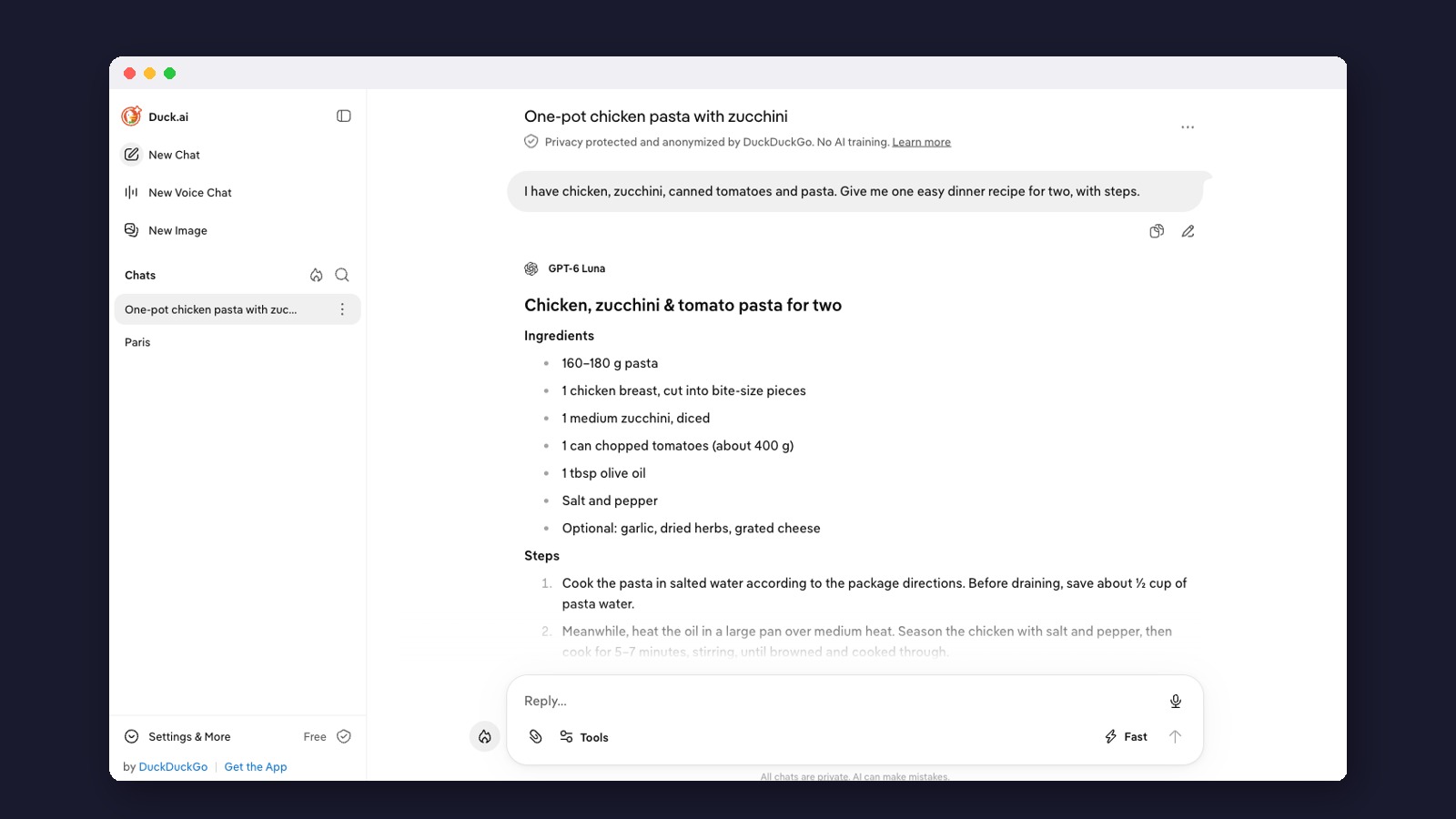
- Cook with what you have. “I have chicken, zucchini, canned tomatoes and pasta. What can I make?”
- Set up a budget. “Make a monthly budget template for someone earning $4,000 a month.”
- Find gift ideas. “Ten birthday gifts under $50 for someone who loves gardening.”
- Get journaling prompts. Ask for a few prompts to help you reflect on your day or plan the next one.
- Make a workout plan. “A four-week beginner plan with no gym needed.”
- Ask about something you can see. Take a photo of a plant, a confusing bill or a warning light and ask what it is.
- Write a speech or toast. “A warm two-minute wedding toast from a friend of 15 years.”
- Get parenting ideas. Activity ideas, child development basics and gentle ways to explain hard topics.
Creative projects (10 things)
- Write stories. Give it characters and a setting and build a story together.
- Make images. Describe a picture and get one back. ChatGPT Images, Gemini and Adobe Firefly all have free options with daily limits.
- Write song lyrics. “A country song about a dog who loves the mail carrier.”
- Script a video. Outline your idea and get a script with an opening, main points and a close.
- Plan blog posts. Ideas, outlines, first drafts and edits.
- Develop a podcast. Show ideas, episode topics, interview questions and show notes.
- Name a business. Get a long list of name and tagline ideas to react to.
- Design a game. Rules, characters and a backstory for a board game or party game.
- Write a bedtime story. “A short story starring my daughter, who loves dinosaurs.”
- Shape your personal brand. A short bio and a consistent way to describe what you do.
Ready to try? Our guide to writing AI prompts shows how to ask so you get better answers, and the best AI tools for beginners matches tools to tasks. For more everyday ideas, see how AI makes life better. Not sure where to begin? Read where to start with AI.
What is new that AI can do in 2026?
- Talk out loud. You can have a spoken conversation for free in ChatGPT, Claude and Gemini Live.
- Answers with sources. ChatGPT and Claude can search the web on their free plans and show where the answer came from.
- Research mode. The assistant reads many web pages and writes a report. Gemini Deep Research is free; ChatGPT’s is limited on the free plan; Claude’s Research needs a paid plan.
- Photos and files. Upload a photo, PDF or spreadsheet and ask questions about it. Free plans have limits.
- Connect your apps. ChatGPT calls these Plugins, Claude calls them Connectors and Gemini calls them Connected Apps. They let the assistant read your calendar or documents when you allow it.
- Do tasks in a browser. Assistants that click through websites for you are paid-only for now: ChatGPT Work on paid ChatGPT plans, Claude in Chrome on Claude Pro and above, and Chrome auto browse on Google AI Pro and Ultra.
What can AI not do well?
- Be trusted on facts without checking. AI can state wrong things confidently. Check names, numbers, dates and quotes that matter.
- Keep secrets by default. Think before pasting private details. Our AI privacy guide shows the settings to change.
- Replace professional advice. It can help you understand a medical, legal or money question and prepare for an appointment, not stand in for one.
- Know you. It doesn’t know your situation unless you explain it, so the more context you give, the better the help.
Frequently asked questions
Can AI really do all of these things well?
For most of them, yes, as a first draft or a helpful starting point. The results depend on how clearly you ask. Anything factual, legal, medical or financial still needs a human check.
Which AI tool is best for these tasks?
For everyday writing, explaining and planning, ChatGPT, Claude and Gemini are all good. For answers you can check, turn on web search. For images, try ChatGPT Images, Gemini or Adobe Firefly. Our AI tools directory lists many more.
How much does it cost?
Nothing to start: all 50 examples work on free plans, with daily limits. Paid plans raise those limits and add features: ChatGPT Plus and Claude Pro are $20 a month, and Google AI Pro is $19.99 (Google).
Will AI do the work for me?
It does the first draft, the research and the options. You still decide, edit and check. Think of it as an assistant for the first pass, while the decisions stay with you.
What is the quickest way to get good at this?
Use it a little every day on real tasks. Our free daily newsletter brings one idea to try each day, and our 30-day plan for learning AI lays out the first month. If you want structure, the best free AI courses are a good next step. New to AI altogether? Start with what artificial intelligence is.
Made for regular people, by a real person
Want a new thing to try with AI every day? Our free daily newsletter brings one practical idea, one tool and one tip. Curated and edited by a human, in plain English.
Free forever. Unsubscribe anytime.
You may also like
- Essential AI Skills Everyone Needs
- Free AI Tools With No Sign-Up
- Duck.ai: Private AI Chat
- AI Glossary
- AI for Small Business
- Make Money With AI
Sources
- Chatterji et al.: How People Use ChatGPT (NBER working paper 34255, 2025)
- Pew Research Center: Americans and AI 2026
- Anthropic Economic Index (June 2026)
- OpenAI: ChatGPT Images 2.5
- ChatGPT plans and pricing
- Claude plans and pricing
- Google Gemini subscriptions
- Gemini Deep Research
- Adobe Firefly
- OpenAI Help: ChatGPT Work cloud browser
- Anthropic Help: Claude in Chrome