

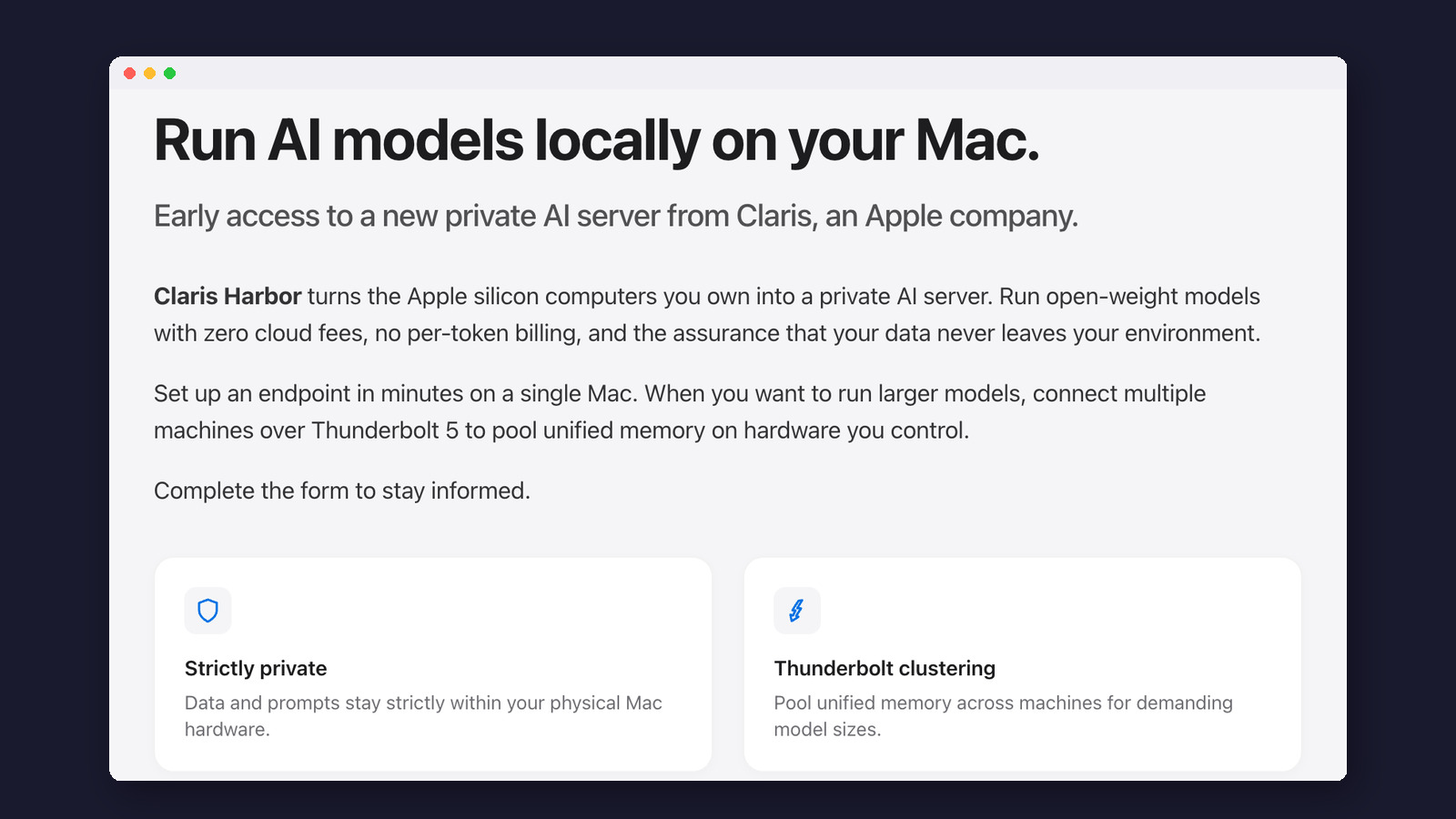
Apple’s software company Claris is testing Harbor, a Mac app that runs AI models on your own computers instead of in the cloud. This guide covers what it does, what it needs, and what Claris still hasn’t said.
The short version: Claris Harbor is a Mac app that turns Apple silicon Macs into a private AI server. It runs open-weight AI models on your own hardware, so prompts never leave the machine and there is no per-use bill. With Thunderbolt 5 cables, several Macs can pool their memory to run models too big for one. It comes from Claris, the FileMaker company Apple owns. It showed up in a Mac App Store listing on November 10, 2026 that has since been removed, and right now it is a private preview with a sign-up form. There is no price, release date, model list or list of supported Macs yet. If you want local AI today, free apps like LM Studio and Ollama already do the single-Mac part.
Most AI chatbots run on someone else’s computers. You type a question, it travels to a data center, and the answer comes back. Harbor is Apple’s first visible move toward the opposite idea: keep the AI on Macs you control. Apple has been adding AI to its own apps all year, and our daily newsletter recently covered Siri doing real tasks inside 15 Apple apps. Harbor is a different kind of product. It isn’t part of Siri or Apple Intelligence, and it isn’t on the iPhone. We read Claris’s preview page and Apple’s developer notes, checked one of our own Macs against the requirements we could confirm, and lined Harbor up against the local AI apps you can download now. Nobody outside the preview can install Harbor yet, so nothing here is a hands-on test of the app itself.
What is Claris Harbor?
Claris’s preview page sums it up in one line: Harbor “turns the Apple silicon computers you own into a private AI server.” Put simply, Harbor downloads AI models and runs them on your Mac, then lets other apps send that Mac questions the way they would send them to ChatGPT or Claude online. Claris calls this an “endpoint.”
The models are open-weight models: AI models whose makers publish the files so anyone can download and run them. Running one yourself means no subscription for the model and no charge per question. Claris’s wording is “zero cloud fees, no per-token billing.” Those are usage fees. The app itself may still cost money, and Claris hasn’t named a price.

Words you will meet
- Local AI
- An AI model that runs on your own device instead of a company’s servers.
- Open-weight model
- A model whose files are published, so you can download and run it yourself.
- Endpoint
- An address other apps can send prompts to, the way they would call an online AI service.
- Unified memory
- The single pool of memory an Apple silicon Mac shares between its processor and graphics.
- Thunderbolt 5
- The fastest cable port on recent Macs, up to 120 Gb/s (gigabits per second).
Is Harbor an Apple product?
Partly. Harbor comes from Claris, which describes itself as “an Apple company” and has made the FileMaker database app for decades. The Harbor page carries that line at the top, and its footer says Apple and the Apple logo are Apple’s trademarks. Apple itself hasn’t announced Harbor, and there is nothing about it on apple.com or in Apple’s newsroom.
The public found out by accident. On November 10, 2026, the leaker Aaron Perris spotted a Mac App Store listing for Harbor, and MacRumors and Cult of Mac reported that the listing has since been removed. The leaker said the app was once called Fabric, as iDrop News reported, and the header image on Claris’s own page still carries the hidden label “Claris Fabric” in its code.
Claris sells mostly to businesses, and the sign-up form asks for a company name and phone number. MacRumors read that as a sign of a business focus. Claris itself hasn’t named an audience.
What will Harbor do?
Going by the preview page and the App Store text quoted by 9to5Mac, Harbor has four parts:
- A local AI server on one Mac. “Set up an endpoint in minutes on a single Mac,” the page says.
- A model browser. The listing said you can “browse, download, and load open-weight models from within the app.” No specific models have been named.
- Thunderbolt clustering. Connect several Macs with Thunderbolt 5 cables and Harbor “automatically detects your devices” and treats them as one machine with their memory pooled.
- No technical setup. The listing promised “no manual configuration, no command line, no infrastructure expertise required.”
The first two already exist in free apps. LM Studio and Ollama both download open models and can run as a local server; our Ollama vs LM Studio test covers how they differ. The clustering is the new part for regular Mac owners.
Why connect Macs together?
Memory is the limit for local AI. A model has to fit in your computer’s memory to run, and the most capable open models are huge. A Mac with 24 GB of memory handles small and mid-size models well, but the biggest ones need hundreds of gigabytes. Cabling Macs together lets them split the model and share the work.
Apple added the plumbing for this in macOS Tahoe 26.2, under the name RDMA over Thunderbolt (a fast way for linked Macs to reach each other’s memory directly). In a developer session at WWDC26, Explore distributed inference and training with MLX, Apple showed what a small cluster of Mac Studios can do using its MLX tools. These are Apple’s numbers for that technology. Harbor hasn’t published any numbers of its own.
Apple’s cluster numbers
~3x
Speed of four M3 Ultra Macs running a 27-billion-parameter model (a mid-size model), compared with one Mac
180 → 600
Tokens (word pieces) per second when fine-tuning (further training) a model: one M3 Ultra, then four
~1 TB
Memory a 1-trillion-parameter model needs even in compressed (8-bit) form, more than any single Mac has

Setting that up by hand is fiddly. On macOS Tahoe 26, Apple’s technical note says to restart into Recovery mode and type a command in Terminal to turn RDMA on, and to switch off Thunderbolt Bridge when Macs are cabled in a loop. Apple’s WWDC26 session shows a simpler settings switch, “Enable RDMA over Thunderbolt,” on newer macOS. Every Mac in the cluster needs Thunderbolt 5 and macOS 26.2 or later. Harbor’s pitch is that it does these steps for you.
Will Harbor run on your Mac?
Claris has only said “Apple silicon” (any Mac with an M-series chip) for a single Mac, and Thunderbolt 5 for clustering. Thunderbolt 5 is on the MacBook Pro and Mac mini with M4 Pro or M4 Max chips and on recent Mac Studio models, but not on the MacBook Air or Macs with a base M-series chip. It hasn’t given a minimum macOS version or amount of memory. We checked one of our own Macs against what is known.
What we found on our MacOur test machine is a MacBook Pro with an M4 Pro chip and 24 GB of memory, on macOS 26.6.2. In System Report it lists three Thunderbolt/USB4 ports, each “Up to 120 Gb/s,” which is Thunderbolt 5. Apple’s RDMA switch was off (“disabled”), which is the default. So this Mac meets both clustering requirements we could confirm: Thunderbolt 5 and macOS 26.2 or later. Earlier this year we ran the open Gemma 4 model on the same laptop with Ollama: about 30 tokens (word pieces) per second, using 9.3 GB of memory. That gives a feel for what one Mac like this handles on its own.
To check yours:
- Click the Apple menu in the top-left corner and choose About This Mac.
- Look at the Chip line. Any “Apple M” chip counts as Apple silicon. An Intel chip won’t run Harbor.
- Click More Info, scroll down and click System Report.
- In the left column, click Thunderbolt/USB4. A port listed as “Up to 120 Gb/s” is Thunderbolt 5. “Up to 40 Gb/s” is Thunderbolt 3, 4 or USB4, which won’t work for clustering.
Memory matters more than the chip for the size of model you can run. Check the Memory line in About This Mac too, and see our guide to self-hosted AI for what different amounts of memory can handle.
How private is Harbor?
Privacy is the main selling point. Claris says “Data and prompts stay strictly within your physical Mac hardware,” and the App Store listing said “nothing reaches the cloud.” Nothing on Claris’s page mentions Private Cloud Compute (Apple’s own cloud AI) or outside AI servers; the models run on your Mac.
Two caveats. Claris hasn’t published a Harbor privacy policy yet; the sign-up form links only to its general one. And local doesn’t mean correct: an open model on your desk can still give wrong answers, so check anything important. Our AI privacy guide explains what cloud chatbots do with your data, if you’re weighing the two.
Harbor compared with LM Studio, Ollama and Exo
The closest comparison is with apps that already run models on your own computer.
| App | Who makes it | Price | Pools memory across Macs? | Best for |
|---|---|---|---|---|
| Claris Harbor | Claris (Apple) | Not announced | Yes, over Thunderbolt 5 | Small teams who want a private AI server without the setup (once it ships) |
| LM Studio | Element Labs | Free for local use | No | Beginners who want a chat window and a model library |
| Ollama | Ollama | Free for local use | No | Running models in the background for other apps |
| Exo | exo labs (open source) | Free | Yes | Technical users clustering Macs today |
Both LM Studio and Ollama also sell optional cloud plans, and LM Studio’s LM Link preview lets one computer use a model running on another, without pooling memory. If Harbor ships at a fair price, its draw will be clustering with no command line. For one Mac, LM Studio and Ollama already cover most of what Harbor promises. Our LM Studio guide and Ollama guide walk through setup.
How do you get Harbor?
For now, the only step is the “Stay informed on Claris Harbor” form on the preview page. It asks for your name, email, company, phone number and country, and promises updates, not a download. We didn’t fill it in. If you do, you’re sharing business contact details with Claris’s sales team.

What we still don’t know
- Price. Claris hasn’t said whether Harbor will be free, a one-time purchase or a subscription.
- Release date. None announced. 9to5Mac expects it in the “weeks and months ahead,” but that is its estimate.
- Which Macs and how much memory. No minimum chip, memory or macOS version yet.
- Which models. No model list has been published.
- How other apps connect. Claris hasn’t documented the endpoint, so it isn’t known which apps will be able to use it.
- Who can buy it. The business-style sign-up points to teams first, though nothing is confirmed.
Don’t mix it upSearch for “Harbor AI” and you’ll find av/harbor, an unrelated open source tool for running local AI with Docker, and the Harbor container registry, a developer tool. Neither has anything to do with Apple or Claris.
What you can do today
Try local AI on one Mac
- App
- LM Studio or Ollama
- Cost
- Free
- Needs
- Any Apple silicon Mac
Start here to see what local models can do
Wait for Harbor
- App
- Claris Harbor
- Cost
- Unknown
- Needs
- Thunderbolt 5 Macs to cluster
Worth watching if you own several Thunderbolt 5 Macs
Stay in the cloud
- App
- ChatGPT, Claude, Gemini
- Cost
- Free plans and up
- Needs
- Any device
Bigger, stronger models, but your prompts leave your computer
For a private chatbot that still runs in the cloud, see our Confer guide. For local AI step by step, start with how to run open source AI locally.

Frequently asked questions
Is Apple Harbor available to download?
No. It is a private preview. Claris has a sign-up form for updates, and the Mac App Store listing that appeared on November 10, 2026 was removed.
Is Harbor part of Apple Intelligence?
No. Apple Intelligence is Apple’s built-in AI in iPhone, iPad and Mac apps. Harbor is a separate Claris app that runs open models from other makers on your Mac.
Will Harbor be free?
Claris hasn’t said. “No per-token billing” means you won’t pay per question, but the app itself may still cost money.
Does Harbor work on an iPhone or iPad?
Nothing suggests it will. Claris only mentions Macs with Apple silicon.
Do I need several Macs to use Harbor?
No. Claris says it runs on a single Mac. Extra Macs, linked with Thunderbolt 5, are only for running bigger models.
Made for regular people, by a real person
One AI tool, tip or update a day in plain English, tried before we write about it. Curated and edited by a human.
Free forever. Unsubscribe anytime.
You may also like
- Ollama vs LM Studio on My Mac
- How to Run Open Source AI Locally
- Self-Hosted AI: Run Models on Your Own Computer
- LM Studio Guide
- Ollama: Run AI Models on Your Computer for Free
- Confer AI: A Private Chatbot Guide
- Why Privacy Matters When Using AI
- How to Turn Off Apple Intelligence
Sources
- Claris: Claris Harbor private preview page
- Claris: Company page (“Claris, an Apple company”)
- Apple Developer: macOS Tahoe 26.2 release notes (RDMA over Thunderbolt)
- Apple Developer: TN3205, Low-latency communication with RDMA over Thunderbolt
- Apple Developer, WWDC26: Explore distributed inference and training with MLX
- MacRumors: Apple’s Claris testing Harbor app for local AI on Macs (November 10, 2026)
- 9to5Mac: Apple has new Mac app coming to make running local AI models easy (November 10, 2026)
- Cult of Mac: Apple’s upcoming Harbor app promises easier way to run local AI on your Mac(s)
- iDrop News: Claris Harbor app for private AI on Macs over Thunderbolt 5
- LM Studio: LM Link
- LM Studio
- Ollama
- Exo on GitHub
- Our check: a MacBook Pro (M4 Pro, 24 GB, macOS 26.6.2), November 11, 2026. Screenshots by Beginners in AI.