

Anthropic gave Claude a whiteboard, a spreadsheet and apps that open inside the chat. We built a whiteboard from one message to see what a beginner gets.
The short version: On November 10, 2026, Anthropic added three things to Claude. Whiteboards (beta) turn a messy plan into a visual board with dates and owners. Sheets (beta) builds simple working spreadsheets. Interactive connectors open apps such as Canva, Asana and Notion inside the chat. Whiteboards and Sheets need a paid plan; Anthropic says interactive connectors are coming to all plans on the web and desktop app. There is no price change. In our test, one message produced an 11-step picnic timeline in about a minute and a half, and Claude caught that our date fell on the wrong day of the week. Claude Meetings, which takes notes on calls, is “coming soon.”
Anthropic announced the features in three posts on its site (an overview, one on Sheets, Whiteboards and Data and one on interactive connectors), a day after it released a new model, Claude Fable 5.2. Our daily newsletter covered what Fable 5.2 built in its first tests. On November 11 we opened the new tools in a paid Claude account and built one whiteboard from start to finish. We didn’t test Sheets, Data or Meetings, and we say so where we describe them. New to Claude? Start with our guide to using Claude.
What did Anthropic announce on November 10?
| Feature | What it does | Status | Who gets it |
|---|---|---|---|
| Whiteboards | Lays out a plan as a visual board: timelines, sticky notes, owners, dates | Beta | Pro, Max, Ultra, Team, Enterprise |
| Sheets | Builds a working spreadsheet with tabs, formulas and drop-downs | Beta | All paid plans |
| Interactive connectors | Apps like Canva, Asana and Notion open inside the chat, and Claude can edit what you have open | Rolling out | All plans, web and desktop app |
| Claude Data | Dashboards and reports from company databases (the new name for Claude Dashboards) | Available | All paid plans |
| Claude Meetings | Joins a call, takes notes and updates your team’s documents | Coming soon | Not announced |
Plan details come from Anthropic’s posts and its Whiteboards help page. None of them announces a new price: the features use your plan’s normal usage limits. Our Claude pricing guide lists what each plan costs.
How do you start a Claude whiteboard?
- Open a new chat on claude.ai, in the desktop app or on your phone.
- Ask for a whiteboard. Start your message with “Start a whiteboard to…” and describe the plan in everyday words. Anthropic’s help page says you can also open the Artifacts tab and pick the Whiteboard tile.
- Give it names and dates. Say who does what and by when. In our test, Claude gave each person their own color.
- Wait a minute or two. The board opens next to the chat while Claude lays it out.
This is the exact message we sent. Copy it and swap in your own event:
Start a whiteboard to plan a family picnic for 20 people on Saturday, June 13. We need a park booking, food, games for kids, and a rain plan. My sister handles food, I handle the park, my brother does games. Lay it out as a timeline with owners and dates.
What happened when we built one?
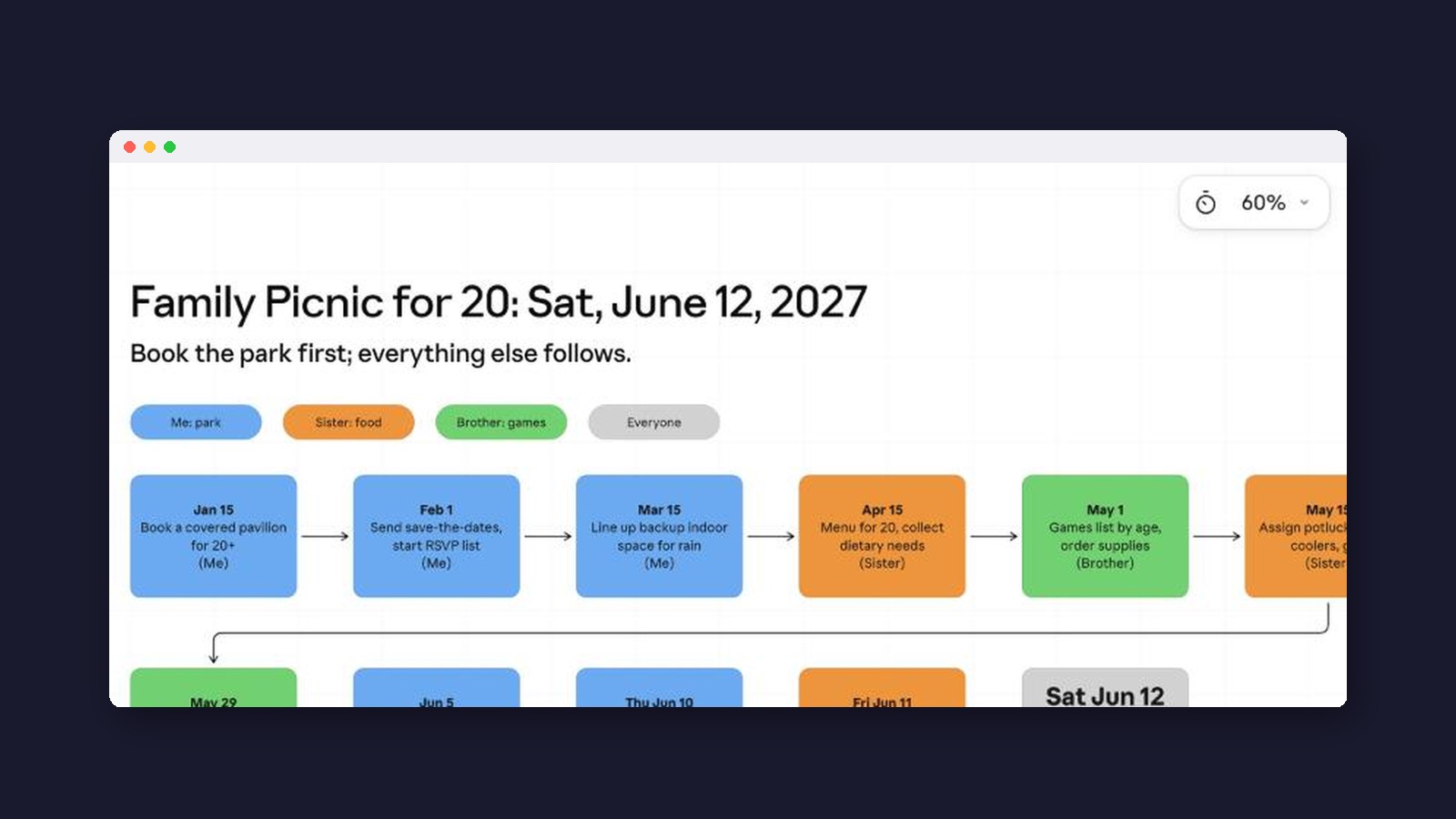
Claude opened a blank board beside the chat and showed its progress (“Laying out the timeline with colour-coded…”). About a minute and a half later the board was finished.

The board had a title, a color key for each person and an 11-step timeline, starting with booking a covered pavilion on January 15 and ending on picnic day. Under the timeline, Claude added a rain plan with a go or no-go decision two days before, and a schedule for the day itself.


What surprised usWe asked for Saturday, June 13. Claude replied that the next June 13, in 2027, is a Sunday, planned the board for Saturday, June 12 instead, and offered to shift every date if we meant Sunday. People make that slip in group chats all the time, and Claude flagged it instead of copying it.
Editing just one part of the board
Anthropic’s help page describes drawing a box around part of the board and asking Claude about only that part. We selected the rain plan and clicked Ask Claude in the toolbar at the bottom, which opened a small “Describe a change” box.


We asked for three cheap indoor backup spots and a reminder to call them by May 1. Within about 40 seconds a new section appeared under the rain plan: a community center room, a church or faith-group hall, and a library or park-district meeting room, each with a line on what to ask. The yellow reminder also pointed out that our own timeline already said to line up backup space by March 15, and suggested calling before then.

How do you share or export a whiteboard?
Click Share at the top of the board. A new board starts as “Only you.” From here you can invite people by email so they can comment and edit, or switch general access to a view-only public link. We left these settings as they were.

The Export tab saves the board as a PNG image or turns it into something else: Claude Slides, Claude Docs, Claude Design, or another format you describe. Anthropic’s help page says a separate Send to option can also move boards to Lucid, Miro and Zoho Vani.

What is Claude Sheets?
Sheets is a new kind of artifact, the panel Claude opens beside a chat for things you can keep and edit (our artifacts guide explains them). You ask for something like a hiring budget or a campaign tracker, and, according to Anthropic, Claude builds a working sheet with tabs, formulas, formatting and drop-down menus, edits cells when you ask, and explains each change. Teammates can work in the same sheet.
Anthropic calls it “simple spreadsheet functionality” for now and points people who need full Excel features to exporting the file or using Claude for Excel. It is also separate from Claude for Google Workspace, the add-on that puts Claude inside Google Sheets. We didn’t test Sheets for this guide. For other ways to get AI help with spreadsheets, see our best AI for spreadsheets roundup.
What are interactive connectors?
A connector links Claude to another app you use, such as Gmail, Google Drive or Notion, so it can read or change things there with your permission. Earlier this year Anthropic added interactive connectors that showed a small live view of an app in the chat. Now the whole app can open inside Claude, beside the chat or full screen. For Notion and Confluence, the announcement says you get the full editor, signed in to your own account, and you can ask Claude to change the page you have open. You still approve each action, as with other connectors. Our connectors vs plugins guide explains the difference between the two.
Anthropic’s directory of interactive connectors listed 13 when we checked on November 11, including Adobe, Asana, Atlassian, Box, Canva, Dropbox, HubSpot, monday.com, Notion and Webflow.

Inside a chat, connectors live under the + button in the message box. Hover over Connectors to see every app you have connected, each with an on or off switch for that chat, plus Add connector and Manage connectors.


Interactive connectors are part of what Anthropic calls the new Claude experience, which combines chat with Cowork (Claude’s mode for longer, multi-step tasks). They appear once your account gets that update. They are built on MCP Apps, an extension of the Model Context Protocol, the open standard Anthropic introduced for connecting AI to other apps.
Claude Data and Claude Meetings
Claude Data is the new name for Claude Dashboards. It answers questions about company data stored in tools like Snowflake, BigQuery or Salesforce and turns the answers into dashboards, written reports or short narrated videos. It needs a data connector, so it is aimed at businesses rather than personal use.
Claude Meetings would let you add Claude to a call to take notes and update your team’s documents. Anthropic’s own post calls it “coming soon” without a date, plan or price. TechCrunch reported an early beta for business plans that works only with Google Meet, where Claude joins as a visible participant. Until it reaches your account, our best AI for meeting notes guide covers tools you can use today.
Who gets these features, and what do they cost?
| Plan | Whiteboards | Sheets | Interactive connectors |
|---|---|---|---|
| Free | No | No | Yes, as it rolls out (web and desktop) |
| Pro, Max, Ultra | Yes | Yes | Yes |
| Team | Yes, on by default | Yes, on by default | Yes, once your organization turns on the new Claude experience |
| Enterprise | Off until an admin turns it on | Off until an admin turns it on | Yes, once your organization turns on the new Claude experience |
Whiteboards work on the web, the desktop app and phones. Anthropic’s connector post mentions only the web and desktop app. None of these features costs extra; each board counts toward your plan’s usage limits, according to the Whiteboards help page.
Limits worth knowing
- Whiteboards don’t read your connected apps. The help page says Claude only sees what is on the board, so it won’t pull your calendar or Notion pages onto it.
- No importing. You can’t load a board from a file yet.
- Beta rough edges. In our test one new section title was cut off on the board.
- Sheets is basic. Anthropic calls it simple and suggests Excel for heavier work.
- Not for health records at work. Whiteboards aren’t available to organizations set up for HIPAA, the US health privacy law.
- Few hands-on reviews yet. Yahoo Finance and The Decoder reported the launch the same day, and Yahoo noted it came about nine days before Anthropic’s expected stock market listing. None of the coverage we read included hands-on tests.
Our verdict: the whiteboard is the easiest of the new tools for a beginner to try, because you only have to describe a plan. It works best for events, trips and small projects with a few people and dates. Read the board before you send it to anyone, as you would any AI answer. For a wider look at Claude’s year, see what’s new in Claude in 2026.

Frequently asked questions
Are Claude Whiteboards free?
No. Whiteboards need a Pro, Max, Ultra, Team or Enterprise plan. Interactive connectors are the one new feature Anthropic says is coming to free accounts.
How do I open a whiteboard in Claude?
Start a message with “Start a whiteboard to…” and describe your plan, or open the Artifacts tab and pick Whiteboard.
Can other people edit my whiteboard?
Only if you invite them. A new board is private (“Only you”). Use Share to invite people by email, or make a view-only public link.
Is Claude Sheets the same as Google Sheets?
No. Claude Sheets is a simple spreadsheet Claude builds inside the Claude app. You can export it as an Excel or CSV file to open elsewhere.
When is Claude Meetings coming out?
Anthropic hasn’t given a date. Its post says “coming soon,” and early reports describe a beta for business plans on Google Meet.
Made for regular people, by a real person
One AI tool, tip or update a day in plain English, tried before we write about it. Curated and edited by a human.
Free forever. Unsubscribe anytime.
You may also like
- How to Use Claude AI
- Claude Cowork
- Claude Artifacts
- AI Connectors vs Plugins
- Claude Pricing
- Best AI for Spreadsheets
- Best AI for Meeting Notes
- What’s New in Claude 2026
Sources
- Anthropic: More ways to work with Claude: Sheets, Whiteboards and interactive connectors (November 10, 2026)
- Anthropic: Sheets, Whiteboards and Data (November 10, 2026)
- Anthropic: Interactive connectors bring the full tool into Claude (November 10, 2026)
- Claude Help Center: Get started with Claude Whiteboards
- Claude directory: Featured interactive connectors
- Claude docs: MCP Apps getting started
- Anthropic: Claude Fable 5.2 and Mythos 5.2 (November 9, 2026)
- Anthropic: Claude now works in Google Docs, Sheets and Slides
- TechCrunch: Anthropic launches Claude Meetings (November 10, 2026)
- The Decoder: Anthropic turns Claude into a full workspace (November 10, 2026)
- Yahoo Finance: Anthropic launches Meetings, Whiteboards, Sheets, Data ahead of IPO (November 10, 2026)
- Our test: a paid Claude account in Chrome on a Mac, November 11, 2026. Screenshots by Beginners in AI.