

Updated October 28, 2026
The short version: Suno turns a text description, or your own lyrics, into a full song with vocals in about a minute. The new v6 models (September 2026) sound noticeably better, and free users get v6-mini. The free plan gives about 10 songs a day but only 7 downloads ever and no commercial use. Pro ($10 a month, or $8 a month billed yearly) adds commercial rights and 20 downloads a month; Premier ($30 a month, or $24 a month billed yearly) adds Suno Studio for editing songs track by track.
Updated October 2026: rewritten for Suno v6, the new download limits and monthly prices, Studio 2.0, Suno’s deals with record labels, and what changed at Udio and Stable Audio.
Suno is the AI music generator most people try first. Describe a song, or paste in your own lyrics, and about a minute later you have a finished track with singing, instruments and a chorus you can hum. Suno says nearly 100 million people have made music with it. This guide covers what it does well, what changed in 2026, and who needs a paid plan. Comparing tools? See our best AI music generators.
What does Suno do well?
Type something like “upbeat indie folk about a road trip through Arizona, female vocal, acoustic guitar, light percussion” and Suno writes the words, sings them and builds the backing track. Each request makes two versions. The v6 models, released in September 2026, made a clear jump in sound quality; Suno says it developed them with industry partners including Warner Music Group. Pro and Premier subscribers get v6 and an experimental v6-wild; free users get v6-mini, a faster version. All older models have been retired, though songs you already made stay in your library.
Suno works best on popular music with verses and a chorus: folk, indie pop, country, lo-fi hip hop, synthwave, gospel and most rock. It understands mood, tempo and instrument requests and picks up style shorthand like “early 2000s pop punk.”
How do you make a song with your own lyrics?
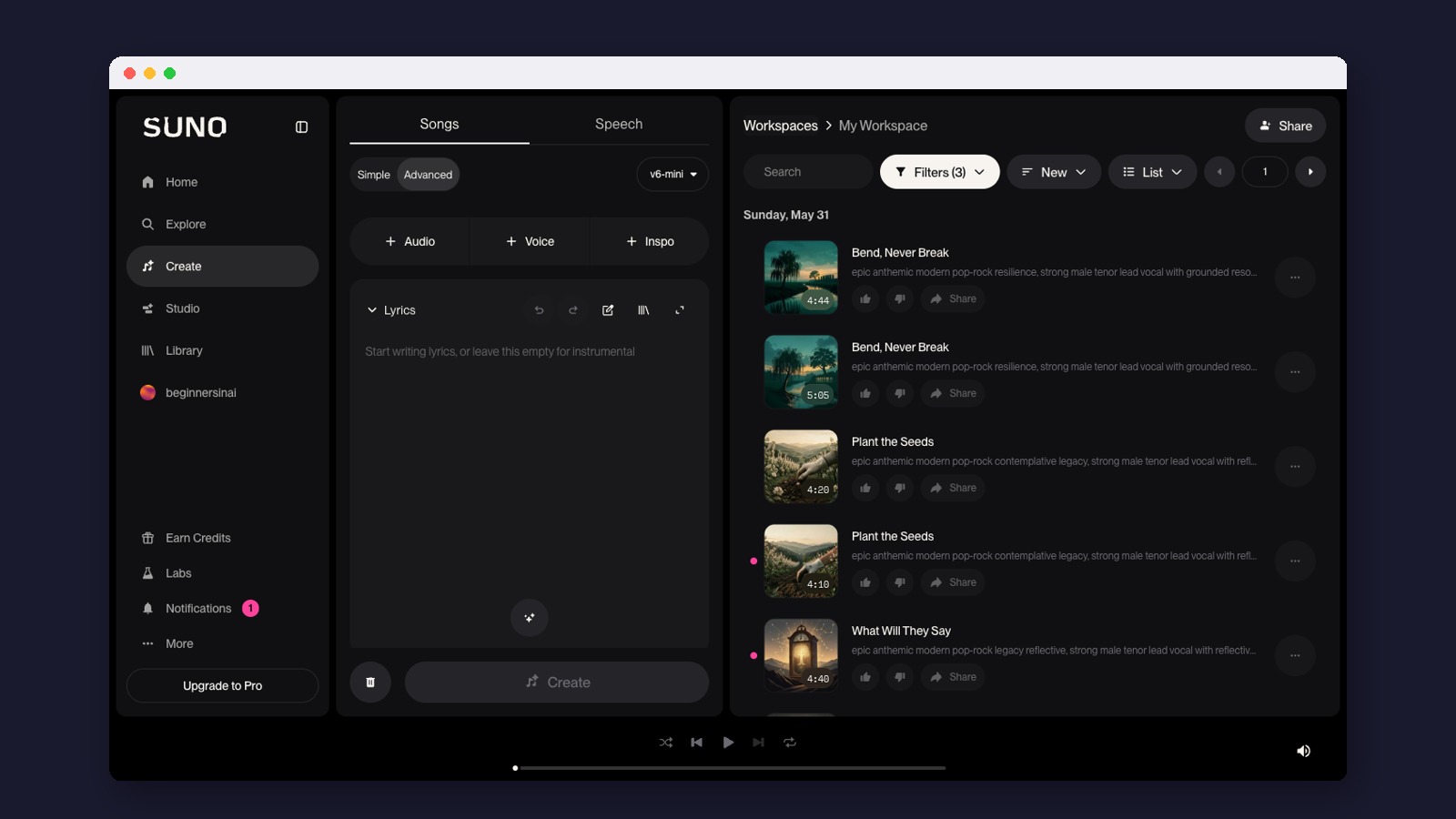
Open Create and choose Advanced (the other tab, Simple, takes a one-line description). Advanced gives you two boxes:
- Lyrics (up to 5,000 characters): the words you want sung. Leave it empty for an instrumental.
- Styles (up to 1,000 characters): the sound, such as “dreamy bedroom pop, female vocal, reverb-heavy guitar, 90 BPM” (beats per minute).
Below them are sliders for vocal gender, length, how experimental to be (Weirdness), how closely to follow your style (Style Influence) and how varied the two versions should be (Variety). Many users also label parts of their lyrics with tags such as [Verse], [Chorus] and [Bridge] to shape the song; Suno’s newer help pages lean more on plain-language edits, like asking for the chorus to be sung by a gospel choir. Write the words yourself if they matter: Suno’s own lyrics tend to be generic. An assistant like Claude can help you draft and tighten them first.
What does each Suno plan include?
Prices and limits from Suno’s pricing page, October 2026:
| Free | Pro | Premier | |
|---|---|---|---|
| Price | $0 | $10 a month, or $8 a month billed yearly | $30 a month, or $24 a month billed yearly |
| Credits | 50 a day (about 10 songs) | 2,500 a month | 10,000 a month |
| Model | v6-mini | v6 and v6-wild | v6 and v6-wild |
| Downloads | 7 trial downloads in total, personal use | 20 songs a month | 60 songs a month |
| Commercial use | No | Yes | Yes |
| Extras | Basic creating | Stems, custom models, your own voice | Everything in Pro, plus Suno Studio |
The biggest change in 2026 is downloads. Since September, free accounts get 7 trial downloads in total, for personal use only. Pro and Premier have monthly download limits, and you can buy more. Premier users who edit in Suno Studio have no download limit for their Studio exports.
Ownership matters too. Under Suno’s terms, songs made on Pro or Premier are assigned to you, though Suno does not promise they can be copyrighted. On the free plan you may only use songs for personal, non-commercial purposes, so anything for a monetized video, podcast or client needs a paid plan.

Want help putting this into practice?
Join the free Beginners in AI community on Skool. You get a 14-day starter path with one small build a day, plus a place to ask questions when you get stuck. No experience needed.
Join the free community →Free to joinWhat is Suno Studio?
Suno Studio launched in September 2025 as a multi-track editor in the browser, for Premier subscribers on desktop. You can split a song into separate tracks (stems), rearrange sections, regenerate just the chorus and export stems as audio or as MIDI (note data you can play through other music software). Studio 2.0 (August 2026) added a built-in synth, effects, better stem separation and a chat bar for asking for changes in plain words. It won’t replace professional music-editing software like Logic or Pro Tools, but it is enough for cleaning up a song for a video or podcast.
Who is Suno good for?
- Podcasters who want an intro and outro that fit the show. Pair it with a voice tool from our ElevenLabs guide; see also AI for podcasters.
- Video creators who need background music for YouTube, courses or social clips.
- Songwriters who write lyrics but don’t play or produce, and want to hear their words sung.
- Small businesses that need a jingle or on-hold music.
- Indie filmmakers and game makers who need custom cues.
How does Suno compare to Udio and Stable Audio?
- Udio was Suno’s closest rival for songs with vocals. After settling with Universal Music in October 2025, it switched off downloads while it moved to licensed models, and it later settled with Warner. You can still create and share songs on its site; plans run from free (3 songs a day) to $30 a month.
- Stable Audio is built for instrumentals, loops and sound effects rather than songs. Stable Audio 3.0, Stability AI says, is trained on licensed music, and you own what you make. There is a free plan with about 12 full tracks a month.
For songs with singing that you can download and use, Suno is the most practical choice today. Add Stable Audio if you need a lot of background music or sound design. Our AI music tools roundup covers more options.
Where does Suno fall short?
- Lyrics. Its own words are often bland. Write yours.
- Pronunciation. Unusual names and non-English words can come out wrong. Spelling them the way they sound usually fixes it.
- Some genres. Jazz, classical and complex progressive rock still sound like imitations.
- Mix quality. Songs sound like strong demos rather than studio releases. For streaming, export the stems and mix them properly.
- The legal picture. Suno now has deals with Warner Music Group, BMG and Believe, but Universal and Sony had not announced deals with Suno as of October 2026. If you build a business on AI music, read the terms and check your distributor’s rules.
How do you get started?
- Go to suno.com and sign up for free. You get 50 credits a day.
- Try a one-line description in Simple, then the same idea in Advanced with your own lyrics.
- Make a few versions and keep the best one.
- If you plan to use songs in anything that earns money, or want more than 7 downloads, move to Pro.
For more tools that work alongside Suno, browse our editor’s picks or the full AI tools directory.
Made for regular people, by a real person
AI music tools change their rules often. Our free daily newsletter tells you what changed and what is worth trying. Curated and edited by a human, in plain English.
Free forever. Unsubscribe anytime.
You may also like
Sources
- Suno: Introducing v6 (September 2026)
- Suno Help: v6 FAQ
- Suno pricing
- Suno: Updated terms and download limits (September 2026)
- Suno terms of service
- Suno: Introducing Suno Studio (2025)
- Suno: Studio 2.0 (August 2026)
- Suno: Warner Music Group partnership (November 2025)
- Suno: BMG partnership (August 2026)
- Suno: Believe partnership (September 2026)
- Udio: A new era (October 2025)
- Udio: Warner partnership (November 2025)
- Udio pricing
- Stability AI: Stable Audio 3.0
- Stable Audio pricing