

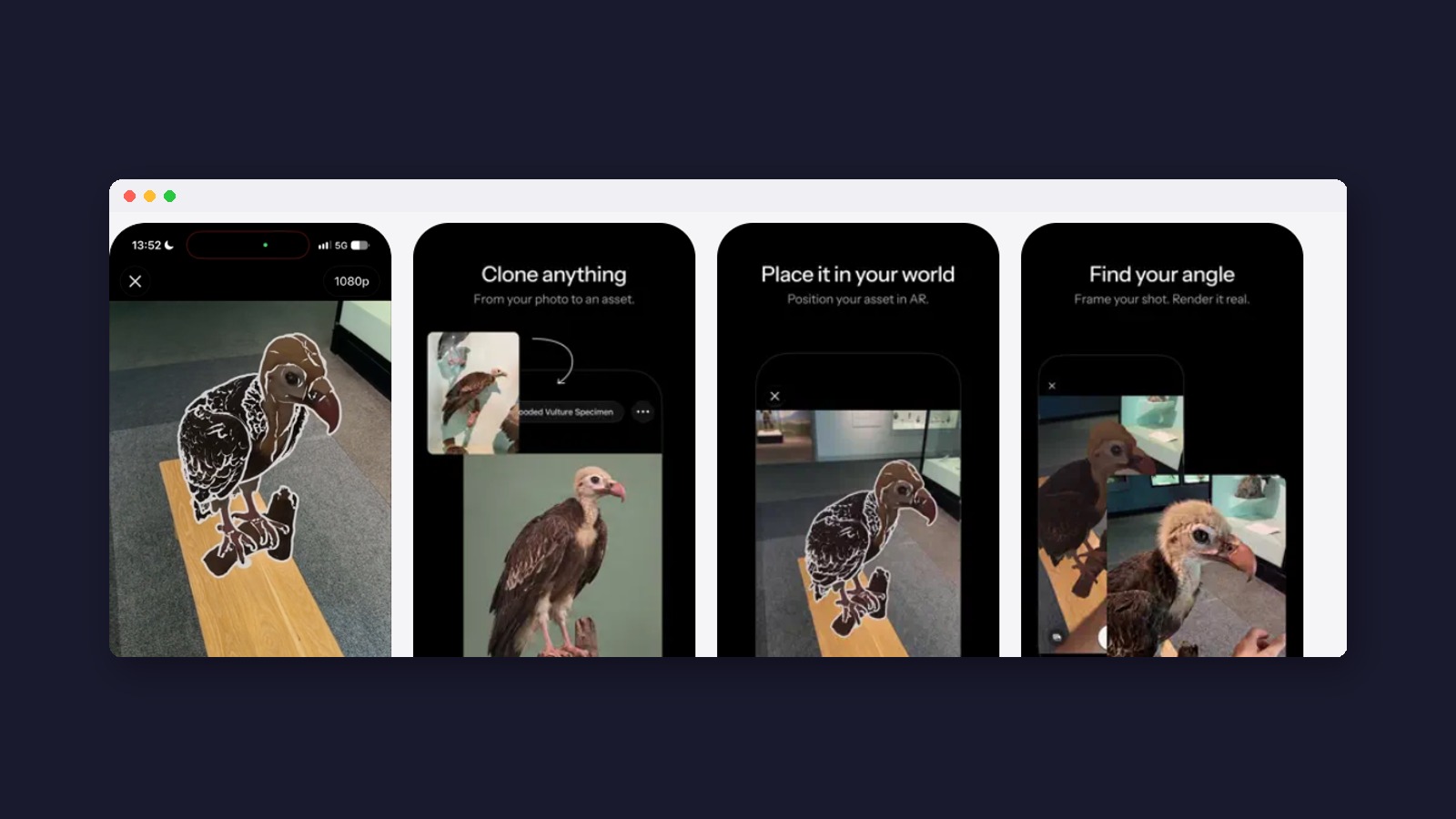
Instead of typing what should happen, you perform it, and an AI character answers back once the app finishes making the new video.
The short version: Simulon is an iPhone app that puts AI-made characters into your real surroundings. Its new Reality-Aware Rendering, live since October 28, 2026, lets you act out a scene with a character, and after you stop filming the app creates a new video where the character reacts to what you did and said. It’s free to try with 100 starter credits; Plus costs $14.99 a month. iPhone only for now.
What is Simulon?
Simulon calls itself “the camera for your imagination”. You pick or create a 3D character, place it in your room through your iPhone’s camera, and capture a photo or video that looks as if it were really there, with matching light and shadows. The company is based in Cape Town, South Africa, and its founder is Divesh Naidoo. It started as a tool for visual-effects artists and relaunched as a consumer app, Simulon 2.0, on October 9, 2026.
What does Reality-Aware Rendering do?
Founder Divesh Naidoo explains: “Place neural assets with your phone and act out the scene. When you stop recording, Simulon renders the take, reading everything in it (what you do, what you say and the place around you), and your assets respond to all of it.” (A “neural asset” is Simulon’s name for an AI-made character or object.)
- Place the character. Set where it stands and how big it is in your room.
- Act out the scene. While you film, the character “becomes a ghost”: it isn’t moving yet. You gesture, move around it and talk to it.
- Stop recording. The video goes to Simulon’s servers, which build the finished clip (this step is called rendering).
- Watch the result. The character now reacts to your actions and words, and can even talk back with lines the AI writes “from his personality and the context of the shot,” in Naidoo’s words.
Naidoo’s pitch: “Instead of typing a prompt, spinning the slot machine and hoping for the best, you can show it, say it and perform it.”


Is the finished video still you?
Not exactly. Simulon says the final clip is “a new performance of the scene, not a copy of the footage”. The whole video is regenerated by AI, including you and your room. That’s why the results look so convincing, and it’s also why you should treat them as AI video rather than an edited recording.
Can people tell? Simulon’s terms, updated October 22, say images carry “content credentials (C2PA metadata) and an invisible watermark,” and that “videos may carry an invisible watermark too.” Content credentials are a hidden label in the file that says it was made or changed with AI. There’s no visible label, though, and the terms make you responsible for telling viewers it’s AI “where the law requires that.” In the EU, for example, rules requiring AI labels apply from August 2026. Its community guidelines ban “deceptive deepfakes.” Our deepfake explainer covers why that matters.
From our read of the fine printThe watermark promise is firm for images and only “may” for video, which is the format this feature makes. If you post a Simulon clip, saying it’s AI in the caption is the safe habit.
Three launches, one idea: skip the text
Simulon’s launch landed the same day as Rime’s new Prism voice model, and five days after Block’s Dessa. One is video and two are voice, but all three bet on the same idea: turning what you say or do into text loses timing, tone and gesture, so these tools work from the recording itself.
Simulon
- What goes in
- Your video: movement, voice, the room
- What it skips
- The typed prompt
- Responds
- After a cloud render
- Can you use it?
- Yes, on iPhone
Make a short video with a character.
Rime Prism
- What goes in
- A caller’s voice
- What it skips
- Turning speech into text first
- Responds
- In about half a second
- Can you use it?
- Businesses only
Power a company’s phone agent.
Block Dessa
- What goes in
- A speaker’s voice
- What it skips
- Text entirely
- Responds
- Live, even mid-sentence
- Can you use it?
- Not yet
Research into human-sounding voice.
The difference is timing. Dessa and Prism answer you live on a call. Simulon’s character is frozen while you film and only “answers” in the finished render, so it’s closer to directing a scene than having a conversation.

Want help putting this into practice?
Join the free Beginners in AI community on Skool. You get a 14-day starter path with one small build a day, plus a place to ask questions when you get stuck. No experience needed.
Join the free community →Free to joinWhat else is like Simulon?
We couldn’t find another app that does all of what Simulon does: place a character with your phone, act with it, then get a re-render where it reacts. These come closest, each from a different side:
- Lightcraft Jetset (iPhone; free, Pro $20/mo): puts 3D sets and models into your camera view live, for indie filmmakers. No AI acting.
- Autodesk Flow Studio (formerly Wonder Studio; web, free tier): swaps an actor in finished footage for a computer-made character that copies their performance.
- Luma’s Ray3 Modify: re-renders filmed footage into a new character or scene while keeping the actor’s motion and timing.
- Runway Aleph 2.0 (paid plans, desktop web): edits clips you upload, changing only what you ask for. See our Runway guide.
- OpenAI’s Sora app: puts a verified likeness of you into fully AI-generated scenes from a prompt. Your real room isn’t used.
Our framing: Simulon sits between Jetset (live, on your phone, but no AI acting) and the Runway and Luma tools (AI driven by a performance, but on a computer, starting from finished footage). For a wider view, see our AI video tools comparison.
Where could you use it?
Simulon’s paid plans allow commercial use (Plus for individuals, Pro for businesses), but the company hasn’t named any customers yet. So these are our ideas for it:
- Small-business ads: a mascot reacting to the owner inside the real shop, for $14.99 a month, versus about $95 a month for pro tools like Flow Studio Pro.
- Classrooms: a dinosaur or a historical figure answering a teacher at the front of the room.
- Family videos: acting out a story with a creature in the living room. Simulon is for ages 13 and up, so younger kids need a parent running it.
- Film planning: rough “previs” shots to test a scene before a real shoot.
- Social clips and skits: what Simulon’s own launch short shows.
Remember Magic Leap?
The promise of a digital creature sharing your real space isn’t new. Magic Leap, a Florida startup, worked mostly in secret for about seven years and raised around $2.3 billion by 2018 on exactly that dream.
- The famous whale. Its video of a whale leaping out of a school gym floor was a special-effects concept, not footage through a headset.
- The headset. The Magic Leap One shipped in August 2018 at $2,295. A report said it sold about 6,000 units in six months against hopes of a million; Magic Leap disputed it.
- The pivot. In 2020 it cut about half its staff and turned to business customers. In July 2026 it said it would stop building its own devices and supply display parts to other companies instead.
Simulon flips that approach. Magic Leap tried to blend digital things into your view live, through a custom headset costing thousands. Simulon uses the phone you already own and does the blending after you film. One thing links them: Magic Leap’s famous whale was a special-effects video, and Simulon’s clips are AI video too. Neither one shows something that was really in the room.
What about smart glasses?
Simulon hasn’t announced anything for glasses. Back in 2023 Naidoo described Apple’s Vision Pro as a possible “spatial authoring device” for arranging characters, with the iPhone still doing the filming. In 2024 he said Vision Pro “is not our priority at the moment.”
Glasses could be a natural next step. Meta now sells AI glasses from $249 to $1,299, including a $799 pair with a small display, and Google and Samsung’s Android XR glasses are due this fall, built around voice help from Gemini. Voice is the main way you control glasses, which is where fast voice AI like Prism and Dessa comes in. That connection is our reading, not something these companies have announced. Our best AI glasses guide covers what you can buy.
What should you watch out for?
- Your home goes to the cloud. While you capture, Simulon’s privacy policy says it uses camera video, motion-sensor data and your microphone, sent to its servers in the US and to AI providers, some in Germany, Singapore and Hong Kong. It says it doesn’t train AI on your data, doesn’t use facial recognition, and deletes your content within 7 days of you deleting your account. More in our AI privacy guide.
- Credits run out. The 100 free credits are one-time, and Simulon doesn’t say how many renders they buy. Making your own characters needs a paid plan.
- It isn’t live. You only see how the character reacted after the render comes back.
- Jobs. A union-commissioned study estimated that about 21.4% of US film, TV and animation jobs would be disrupted by generative AI by 2026, according to a 2024 forecast. It’s based on a survey of executives; it doesn’t count jobs already lost.
Common questions
Can I use Simulon on Android?
Not yet. Simulon says Android is coming soon, without a date, and we found no Simulon app on Google Play.
Do I need an iPhone Pro?
No. Simulon’s privacy policy says the app doesn’t use LiDAR, the extra depth sensor found only on Pro iPhones. You need iOS 17 or later. Simulon doesn’t list the oldest iPhone that runs this feature.
Is it free?
You can try it with 100 one-time credits on characters from Simulon’s library. Your own characters need Plus ($14.99 a month) or Pro ($39.99 a month).
Can I make a video of a celebrity or a friend?
Not in a misleading way. Simulon’s rules ban deceptive deepfakes of real people and require consent before you animate a photo of someone identifiable.
Can I use it for my business?
Yes, on a paid plan: Plus covers commercial use by individuals, and Pro covers businesses.
How is this different from Dessa?
Dessa is a voice AI that talks with you live and isn’t public yet. Simulon makes videos, works after you film, and you can download it today. They share one idea: learn from the real recording instead of a typed or transcribed version. Our Dessa explainer has the voice side.
Made for regular people, by a real person
A free daily newsletter with the new AI apps worth trying, explained without the hype. Curated and edited by a human, in plain English.
Free forever. Unsubscribe anytime.
Sources
- Simulon: plans and pricing
- Simulon on the App Store
- Divesh Naidoo: Introducing Reality-Aware Rendering (October 28, 2026)
- Divesh Naidoo: how the character responds (October 20, 2026)
- Simulon: launch short
- Simulon terms (content credentials and watermarks)
- Simulon community guidelines
- Simulon privacy policy
- Baker McKenzie: EU AI transparency rules from August 2026
- Animation World Network: Animation Guild generative AI study
- Crunchbase News: Magic Leap funding timeline
- The Register: Magic Leap’s whale video
- Engadget: Magic Leap One sales report
- UC Today: Magic Leap’s 2026 shift
- IDC: Meta Connect 2026 and smart glasses
- 9to5Google: Android XR glasses