

At a glance: Grok Imagine Agent Mode
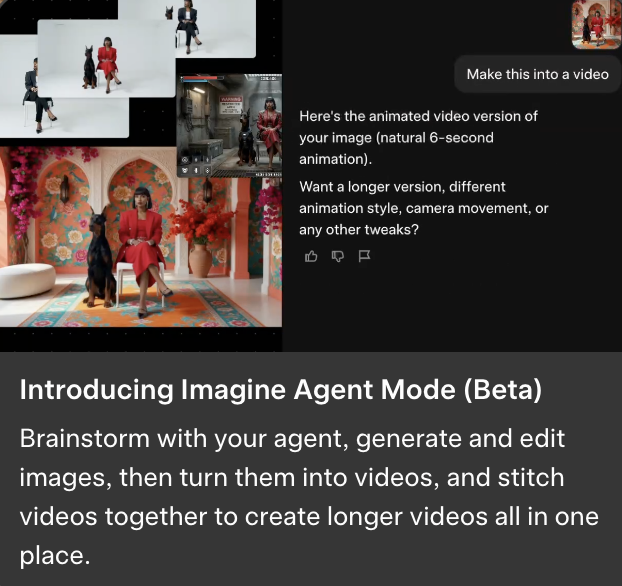
- What it is: a new beta mode inside Grok Imagine that replaces the chat window with an “infinite canvas.” The agent plans, generates, edits, and stitches images and videos in one place.
- What is new: batch image generation, image-to-6-second video, auto-stitching short clips into longer films, transitions, and four preset workflow templates (Create Worlds, Short Film, UGC Product Stories, Brand Identity).
- Who it is for: creators making short films, brand storytellers, agency teams building UGC product stories, anyone tired of prompting image-by-image.
- How to try it: Grok web app, paid account, toggle Agent Mode in the input field. Currently web-only.

xAI quietly launched Grok Imagine Agent Mode in beta on the web version of Grok this week. Elon Musk announced it on X with a one-line post; the launch is otherwise low-key. The product itself is not. It is the most ambitious agent-driven creative surface xAI has shipped and it directly competes with OpenAI’s Images 2.0, Meta’s Vibes platform, and Google’s Stitch / AI Studio. This guide is the beginner-friendly read on what it is, what it does, and whether it matters.
What is Grok Imagine Agent Mode?
Grok Imagine Agent Mode is a new beta-only interface inside the Grok web app. Instead of the usual chat-style prompt-and-response loop, you get an “infinite canvas” workspace. You type a single instruction describing what you want to make. The agent then plans, generates, and edits the images and videos to fulfill that instruction. You can interrupt, refine, redo, or branch at any point.
The shift from chat to canvas matters. Chat is one prompt, one output. Canvas is dozens of outputs in a layout you can move around, compare, edit in place, and stitch together. Most creative workflows in 2026 (storyboarding, brand asset development, short film production) want canvas-style work, not chat. This is xAI’s bet that creators will switch tools when one of them stops feeling like a chatbot.
For context on Grok’s broader ecosystem in 2026, see our What’s New in Grok 2026 roundup. For the wider AI video market, see our Sora vs Runway vs Kling comparison.
What does the agent actually do?
Five capabilities define Agent Mode in beta:
- Batch image generation. Generate multiple variants of an image in parallel, not one at a time. Useful when you want options before you pick.
- Image editing on the canvas. Select a generated image, describe a change in plain English, get an edited version next to the original. Standard for AI image editors at this point, but built into the workflow.
- Image-to-video. Turn any image into a natural 6-second animation. This is the same feature shown in xAI’s launch screenshot (the woman in the red dress with a Doberman that animates into a short clip).
- Auto-stitching. Chain multiple 6-second clips into a longer sequence with transitions. The agent handles the cut points and pacing.
- Export. Pull the final video or image set out of the canvas as a standard file you can post or share.
The interesting capability is the auto-stitch. Most current AI video tools (Runway, Veo, Kling, Hailuo) produce single 5-to-10-second clips. Stitching them into a longer film is a separate editing step in a different tool. Agent Mode brings that into one place.
What are the four preset workflows?
The launch ships with four templates that pre-configure the canvas for a specific use case. You can also start from a blank canvas.
- Create Worlds. For building consistent visual settings (a forest, a city, a fantasy castle). The agent generates establishing shots, alternate angles, lighting variations, and character placements inside the same world.
- Short Film. For a one-minute narrative piece. Storyboard scenes, generate the shots, animate, stitch together. xAI says this is the workflow it has tuned the most aggressively.
- UGC Product Stories. For brands and agencies making user-generated-content-style product videos. Photo, lifestyle context, animated demo, voiceover-ready cut.
- Brand Identity. For logos, palette exploration, packaging variants, social media assets, and brand-consistent imagery across formats.
Each template starts you with a different blank canvas and different default prompts. If you have used a specific Adobe template or a Figma kit, the concept will feel familiar.
How does this fit into xAI’s broader Grok stack?
Agent Mode is a feature, not a separate product. It runs on top of the existing Grok Imagine (image and video generation), which itself sits inside the Grok web app. The underlying model is Grok 4.3, which The Decoder reports launched with steep price cuts and Imagine Agent Mode as the headline new capability.
That makes Agent Mode the third major Grok release in May 2026, after the connectors launch (covered in our Grok Connectors explainer) and the Grok Skills feature (in our Grok Skills preview). xAI’s release cadence in 2026 has been aggressive.
How does it compare to OpenAI, Meta, and Google?
The agentic-creative-surface race in 2026 has four serious players. Each took a different bet on what creators want.
- OpenAI Images 2.0. Strong on image quality and consistency. No comparable canvas workspace yet. Best when you want one excellent image.
- Meta Vibes. Social-feed-first creative platform built around short-form video for Instagram and Reels. Different audience than Grok’s.
- Google Stitch + AI Studio. Stitch focuses on UI design generation. AI Studio is the developer playground. Neither yet pulls together a creator-focused canvas the way Grok Agent Mode does.
- Grok Imagine Agent Mode. The most production-workflow-oriented of the four. Best for narrative short film, brand identity, and UGC product stories. Worst for single high-quality images (OpenAI still wins there).
Our broader market context for AI video creators is in the AI Short Drama Market Map if you want the full picture of where this category is going.
Who is this actually useful for?
- Indie creators making short films. Agent Mode handles the producer role (planning, stitching, pacing). You stay focused on the creative direction.
- Brand and marketing teams. The Brand Identity and UGC Product Stories templates compress a week of agency work into a session.
- Storyboard artists and pre-production teams. Generate dozens of shot options, lay them out on a canvas, walk a director through the choices.
- Social media managers. Make 5-to-10-clip story arcs (Instagram Reels, TikTok-style) without leaving one tool.
- Anyone tired of prompting image-by-image. If you have ever spent two hours in Midjourney generating one set of consistent characters, this is the workflow you want.
What can it not do yet?
The beta has real limits. Worth knowing before you commit a project to it.
- No long single-shot videos. The base clip is 6 seconds. Longer footage is stitched, which means cuts. If you want a continuous 30-second shot, Agent Mode is not the tool yet.
- Web only. The iOS and Android Grok apps do not yet have Agent Mode.
- Paid account required. No free tier in beta. Pricing follows the Grok 4.3 tiers.
- Character consistency across long arcs. Like every AI video tool in 2026, character drift over many clips is real. Workarounds exist (reference images, named characters) but they require attention.
- Audio. Agent Mode generates visual content. Sound design, music, and voiceover are still separate steps in separate tools (ElevenLabs, Suno, traditional editors).
How do I try it?
- Sign into the Grok web app at
grok.comwith a paid account. - Open the Imagine surface.
- Look for the Agent Mode toggle in the input field (bottom left of the prompt area).
- Pick one of the four preset templates, or start from a blank canvas.
- Describe the project in one prompt. The agent generates the first round.
- Iterate on the canvas: select, edit, regenerate, branch, stitch.
- Export when satisfied.
The direct link is grok.com/imagine/agent. If you do not see Agent Mode in your Grok web app yet, beta access is rolling out and not every paid account has it from day one.
Common questions about Grok Imagine Agent Mode
Do I need to pay to use it?
Yes. Agent Mode requires a paid Grok account (the Grok 4.3 tier pricing applies). xAI dropped prices on the underlying Grok 4.3 launch, so the entry point is lower than it was. There is no free tier for Agent Mode in beta.
Is the agent better than just prompting Grok normally?
For one-shot images, no. Grok Imagine on its own is fine for that. Agent Mode is better when the project has multiple steps that would otherwise require you to manage state across many prompts (multi-shot narrative, brand identity package, product story).
Can it generate videos longer than 6 seconds?
Yes, via auto-stitching. The base clip is 6 seconds, and the agent chains multiple clips with transitions into longer sequences. xAI is positioning this for one-minute films as the target use case in beta.
What about copyright and content policy?
Grok’s content policy is more permissive than OpenAI or Google’s image generators but still has limits: no real-identifiable-person likeness without consent, no protected IP, no illegal imagery. Read xAI’s published content policy before using Agent Mode for any commercial project.
Is this the same as Grok 4.3?
Agent Mode is a feature built on Grok 4.3 (the latest model that launched alongside it). Grok 4.3 is the underlying intelligence. Agent Mode is the canvas interface on top.
Sources
- The Decoder, “xAI drops Grok 4.3 with steep price cuts and an Imagine agent mode”
- TestingCatalog, “xAI debuts Imagine Agent in Grok with open Canvas AI workspace”
- Phemex News, “xAI’s Grok Imagine Agent Beta Tests Short Film Creation”
- Basenor, “Grok Launches Imagine Agent Mode Beta”
- xAI, Grok Imagine Agent Mode (direct)
Get Smarter About AI Every Morning
Free daily newsletter. Built for people who want to use AI well, not chase every model.
Free forever. Unsubscribe anytime.
You may also like
- What's New in Grok 2026 for the latest Grok feature roundup.
- Grok Connectors Launch for the Gmail / Notion / etc. integrations.
- Grok Skills Preview for the reusable skill files feature.
- Best Grok Prompts for prompt examples that work well in Agent Mode.
- AI Short Drama Market Map for the broader creator-tools landscape.
- Sora vs Runway vs Kling for the foundation video models behind tools like this.